Website Redesign Checklist: Refresh or Rebuild in 2026
Your website is a few years old. Traffic has plateaued or dipped. The design looks dated compared to competitors. Something feels off, but you're not sure what to do about it.
The wrong move here is expensive in both directions. Spend $15,000 on a full rebuild when you only needed a visual refresh, and you've wasted money and time. Slap new paint on a site that's structurally broken, and you're still losing customers to slow load times and confusing navigation.
This website redesign checklist helps you figure out which situation you're in and what to do about it.
This guide is written for Canadian small businesses, so legal and market references use Canadian examples where relevant.
If your redesign includes contact forms, analytics, or advertising scripts, review our guide to website privacy law in Canada before launch.
How to Tell Your Website Needs Attention
Forget vague advice like "it looks outdated." Here are the signs that something is wrong, starting with what you can measure.
Your engagement rate is dropping. Open Google Analytics 4 and compare the last 90 days against your previous baseline. GA4 does not set a universal "good" engagement-rate benchmark, but a sustained decline on your key landing pages is a real warning sign. We explain what engagement rate measures and how to benchmark it properly in a separate guide.
Your bounce rate is climbing. In GA4, bounce rate is the share of sessions that were not engaged sessions (the inverse of engagement rate). If it trends upward on high-intent pages, visitors are leaving before taking meaningful action. Our bounce rate guide breaks down how to interpret this in context.
Core Web Vitals are failing. Google measures your site's loading speed, visual stability, and interactivity. Core Web Vitals are part of Google's page experience signals, but relevance still drives rankings first.
Slow pages still hurt business outcomes because visitors are less likely to stay, explore, or convert. Our post on why Core Web Vitals matter for your business explains what each metric means and how to check yours.
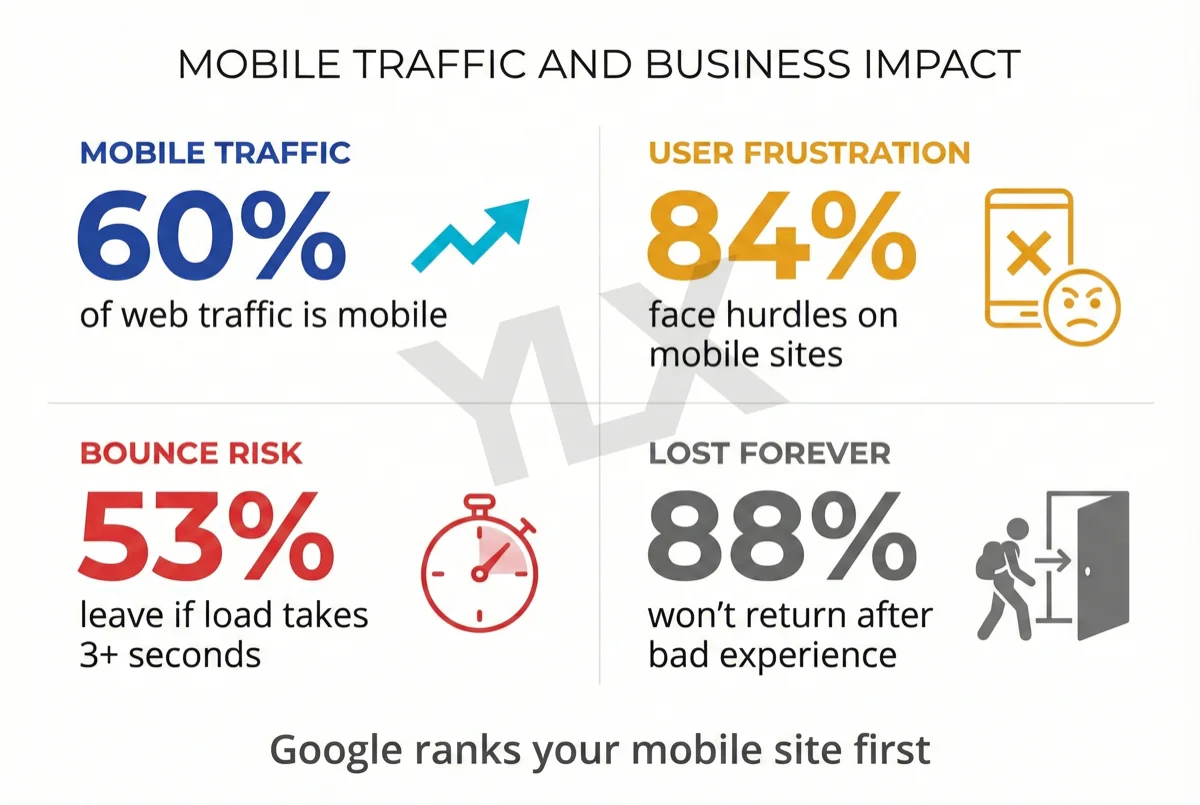
Your site doesn't work on phones. StatCounter's Desktop vs Mobile vs Tablet Market Share Worldwide data (opens in a new tab) shows mobile traffic slightly ahead of desktop globally. Google now uses mobile-first indexing (opens in a new tab), so mobile quality directly affects how your pages are evaluated.
If your site is hard to read or use on a phone, you're creating friction for a large share of your audience. Our guide to responsive web design covers what this means in practice.
The design is eroding trust. This one is qualitative, but research still supports it. A review of credibility research in web design (opens in a new tab) found that first impressions form in 50 milliseconds, and that improved visual design increased credibility ratings for the same content in 90% of cases tested.
DreamHost's 2026 Local Business Trust Index (opens in a new tab), a survey of over 1,200 consumers, found that businesses with websites are perceived as 41% more trustworthy than those without. Your website is the strongest credibility signal your business has outside of online reviews.
If your site looks like it was built in 2018, visitors are forming that judgment before they read a single word.
Security warnings or outdated technology. If browsers show "Not Secure" warnings, your platform hasn't received updates in years, or you're running outdated plugins with known vulnerabilities, the site is a liability. Our post on security must-haves for small business websites explains what to check for.
Refresh vs. Rebuild: Which Do You Need?
This is the decision most businesses get wrong. They either overspend on a rebuild they don't need or underspend on a refresh that doesn't fix the real problems. Here's how to tell the difference.
What a Refresh Covers
A refresh updates the visual layer of your existing site. New colors, typography, imagery, updated content, and minor UX tweaks. You keep the same URL structure, tech stack, and site architecture. The bones stay the same.
Choose a refresh when: Your site loads fast, works on mobile, and the technology underneath is solid, but the design looks dated or the content is stale. Refreshes are faster to complete, less expensive, and carry almost no SEO risk because nothing structural changes.
What a Rebuild Covers
A rebuild replaces the underlying architecture. New navigation, new content structure, potentially a new platform entirely (like moving from WordPress to a custom build). It may involve migrating URLs, restructuring your information architecture, and rethinking how visitors move through the site.
Choose a rebuild when: The site is slow and you can't fix it without changing the platform. It doesn't work on mobile and the framework won't support responsive design. You've outgrown the platform's capabilities.
If navigation confuses visitors, or you're rebranding and need the website to reflect a fundamentally different business, a rebuild is usually the right move.
Quick Decision Table
| Signal | Refresh | Rebuild |
|---|---|---|
| Looks dated but works fine | ✓ | |
| Content is stale or inaccurate | ✓ | |
| Slow page speed or failing Core Web Vitals | ✓ | |
| Not mobile-friendly | ✓ | |
| Can't add features your business needs | ✓ | |
| Platform has security vulnerabilities | ✓ | |
| Navigation confuses visitors | ✓ | |
| You're rebranding | ✓ |
If most of your checkmarks land in the refresh column, you can save time and money with a targeted update. If they're in the rebuild column, a fresh start will solve problems that cosmetic changes can't.
Refresh versus rebuild decision matrix showing refresh for dated design and stale content, and rebuild for speed, mobile, navigation, and platform limitations to choose the right project scope
The Checklist: Before You Start
Whether you're refreshing or rebuilding, these steps apply. Skip any of them and you'll pay for it later.
Six-step pre-launch website redesign flow covering performance audit, URL mapping, accessibility, measurable goals, content planning, and SEO setup to reduce launch risk
1. Audit What's Working
Before you change anything, find out what's already performing. Check Google Analytics for your top pages by traffic and engagement. Check Google Search Console for your best-ranking keywords. Identify which pages bring in leads or sales.
This data tells you what to protect. If your services page ranks #3 for a valuable keyword, you don't want to accidentally break what's working when you redesign around it.
Published UX ROI estimates vary widely depending on methodology and timeframe. The practical takeaway is consistent: redesign work performs better when it starts with your own analytics and conversion data, not assumptions.
2. Document Your URLs
Export every page URL on your current site. If any URLs will change during the redesign, plan 301 redirects before launch, not after.
Google's official site migration documentation (opens in a new tab) confirms that 301 redirects do not cause PageRank loss. They also recommend keeping redirects active for at least one year.
The biggest SEO mistake in a redesign is redirecting all old pages to the homepage. That destroys the search value each individual page has built. Every old URL should point to the most relevant new URL, page by page.
3. Check Accessibility
A redesign is the best time to fix accessibility gaps. In Ontario, AODA web accessibility requirements (opens in a new tab) apply to designated public sector organizations and businesses/non-profits with 50 or more employees. Even when not legally required, accessibility is good practice. Our guide to WCAG web accessibility standards explains what compliance looks like in practice.
At minimum, your redesigned site should have proper heading hierarchy, sufficient color contrast, keyboard navigation support, and descriptive alt text on all images. These aren't just legal requirements. They make your site usable for everyone, including the 27% of Canadians aged 15+ who reported at least one disability in 2022 (opens in a new tab).
4. Set Measurable Goals
"Make it look better" is not a goal you can track. Before the redesign starts, define what success looks like with specific numbers:
- Load time: LCP under 2.5 seconds (Google's "good" threshold)
- Engagement: Higher engagement rate in GA4 than your current baseline
- Conversions: More contact form submissions, phone calls, or whatever your site is supposed to generate
- Core Web Vitals: Passing all three metrics on both mobile and desktop
Write these down. Share them with whoever is doing the work. Revisit them 30 and 90 days after launch.
5. Decide on Content Before Design
Content drives layout. If you design first and fill in content later, you end up with placeholder-shaped pages that don't serve your actual message.
Audit every existing page. For each one, decide: keep as-is, update, merge with another page, or cut entirely. Then list any new pages you need before design starts.
Common additions include a services page for a new offering, a location page for a city you now serve, or a blog section you've been putting off.
All of this should be decided before a designer starts working. Otherwise you're paying for layouts that will need to be redone once the real content arrives.
6. Plan for SEO From Day One
SEO is not a post-launch task. It's baked into every structural decision you make during a redesign.
Before launch:
- Map every old URL to its new equivalent
- Keep title tags and meta descriptions that are already ranking well
- Maintain your internal linking structure or improve it
- Preserve or enhance your heading hierarchy
- Add schema markup if you don't already have it
At launch:
- Submit your updated sitemap to Google Search Console
- Verify all 301 redirects are working
- Test every page on mobile
After launch:
- Monitor Google Search Console daily for the first two weeks
- Watch for crawl errors, dropped pages, or indexing issues
- Check that your most important pages are still appearing in search results
What a Redesign Actually Costs
Pricing varies widely, and anyone who gives you a number without understanding your situation is guessing. That said, here are realistic ranges:
Template refresh: $500 to $2,000. New theme, updated colors and fonts, fresh content. Works for simple sites that just need a visual update.
Custom redesign for a small business: $5,000 to $20,000 or more. Includes strategy, custom design, development, content migration, and SEO planning. The range depends on the number of pages, complexity of features, and whether you're migrating platforms.
The better question isn't "how much does a redesign cost?" It's "how much is my current website costing me?" If your site converts visitors to customers at 1% instead of 3%, the lost revenue every month dwarfs the cost of fixing it.
We wrote a detailed comparison of custom vs. template websites that breaks down the real costs over five years, including hidden costs most businesses don't consider.
After Launch: The First 30 Days
A redesign isn't done when the site goes live. The first month is critical.
First-30-days post-launch monitoring timeline showing week one technical checks, weeks two to three performance comparisons, and week four recovery validation
Week 1: Check Google Search Console daily. Look for crawl errors, pages that dropped out of the index, or redirect chains. Test all forms, buttons, and CTAs on both desktop and mobile. If anything broke, fix it immediately.
Week 2-3: Compare your Core Web Vitals before and after. Check your bounce rate and engagement rate against your pre-launch baseline. If numbers dipped, investigate specific pages rather than panicking about the site overall.
Week 4: Review your initial goals. Are you on track? Temporary ranking and traffic fluctuations can happen after a redesign, especially if URLs changed. If traffic hasn't started to recover by week four, audit your redirect mapping, crawlability, and indexing setup in detail.
Don't make major changes during this period based on incomplete data. Let the numbers stabilize before drawing conclusions.
How We Handle Redesigns at YLX
Every redesign we do starts with performance. Before we touch the visual design, we audit your current Core Web Vitals, page speed, security headers, and accessibility. This tells us whether you need a refresh or a rebuild.
If it's a rebuild, we map every existing URL and set up redirects before launch. We test Core Web Vitals on staging before the site goes live. Every site we build ships with a Content Security Policy, HSTS, and the other security headers that most agencies skip.
We build on Next.js, which means your site loads fast by default. Static pages, automatic image compression, edge caching. No bloated plugins slowing things down.
Bottom Line
A website that's slow, hard to use on mobile, or looks like it was built five years ago is costing you customers whether you can see it in your analytics or not. Visitors are forming opinions about your business in 50 milliseconds. If what they see doesn't look current and credible, they leave.
The question isn't whether to act. It's whether you need a refresh or a rebuild. Use the decision table above, run through the six-step checklist, and you'll go into the process knowing exactly what you need and why.
Not Sure Where Your Website Stands?
We'll review your site's speed, Core Web Vitals, mobile experience, and security setup. No sales pitch. Just a clear picture of what's working and what needs attention.
Get a free website review: Contact us at info@ylx.ca
Analysis FAQ.
How often should I redesign my website?
There is no fixed schedule. Instead of redesigning on a timer, watch for measurable warning signs: failing Core Web Vitals, declining engagement rates in GA4, a design that looks noticeably older than your competitors, or a platform that limits what you can do. Most businesses find their site needs significant attention every 3-5 years, but a well-built site with regular content updates can last longer.
What is the difference between a website refresh and a rebuild?
A refresh updates the visual layer of your existing site: new colors, typography, images, and content within the same structure and tech stack. A rebuild replaces the underlying architecture, navigation, and often the platform itself. Refreshes are faster and cheaper with minimal SEO risk. Rebuilds take longer and cost more but solve structural problems a refresh cannot fix.
How much does a website redesign cost?
A visual refresh using templates typically costs $500-$2,000. A custom redesign for a small business ranges from $5,000 to $20,000 or more depending on scope, number of pages, and functionality required. The real cost question is what a slow, outdated, or broken website costs you in lost customers every month.
How do I redesign my website without losing SEO rankings?
Map every existing URL before you start. If any URLs change, set up 301 redirects from old URLs to new ones before launch. Google confirms that 301 redirects do not cause PageRank loss. Keep title tags and meta descriptions that are already ranking well. Submit your updated sitemap to Google Search Console after launch, and monitor for crawl errors in the first 30 days.
Tagged with

Further Reading
Related Analysis.
What Is Responsive Design? Why Your Site Must Adapt
Responsive design makes your website work on any screen. With mobile and desktop traffic now close to parity and Google indexing mobile-first, it is a core business requirement.
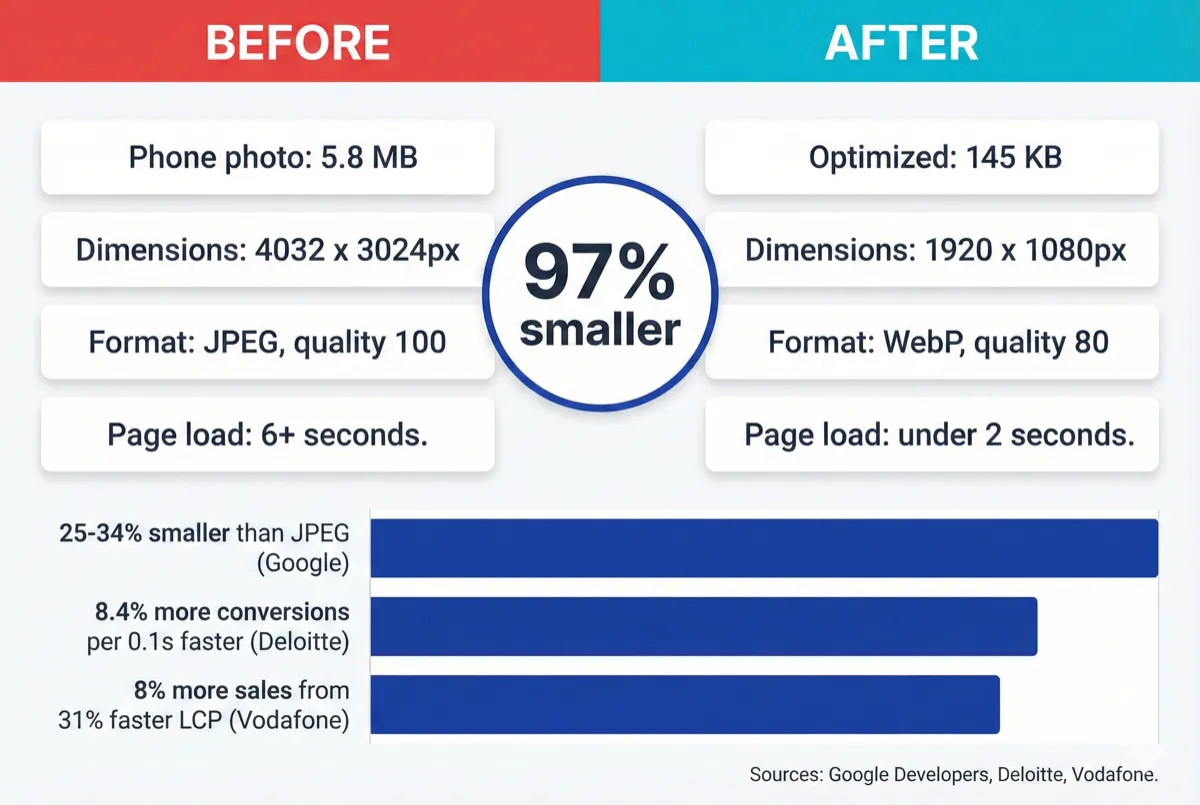
How to Optimize Your Website Images With WebP (2026)
Your website images are probably too large. Learn how to convert to WebP, resize for the web, and serve fast-loading images without visible quality loss.
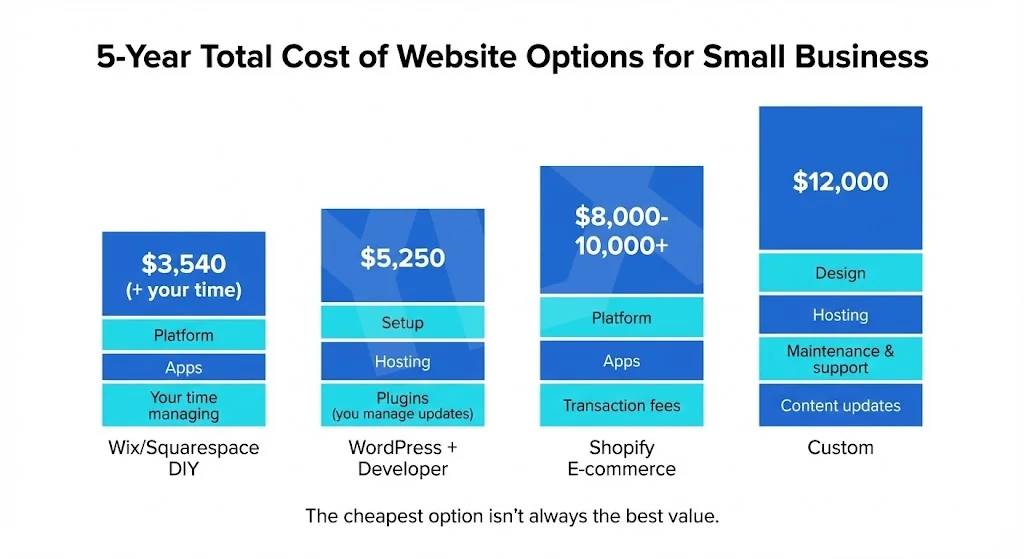
Custom vs Template Websites: What Fits Your Business?
Template or custom? Compare real costs, performance data, and ownership trade-offs so you can choose the website path that fits your business goals today.