What Is Bounce Rate and When It Matters for Your Site
Bounce rate is one of those metrics that gets people into trouble because it sounds simpler than it is.
If you see a high bounce rate, it is tempting to assume the page is failing. Sometimes that is true. Sometimes it is completely wrong.
A visitor can land on a page, find the phone number they needed, call your business, and leave. That can still count as a bounce in some setups. A different visitor can land on the page, get confused, hit the back button, and keep searching. That can also count as a bounce.
Same metric. Very different outcome.
That is why the only useful question is not "is the bounce rate high?" It is "what kind of page is this, what was the visitor trying to do, and did the page help?"
What Bounce Rate Means in GA4
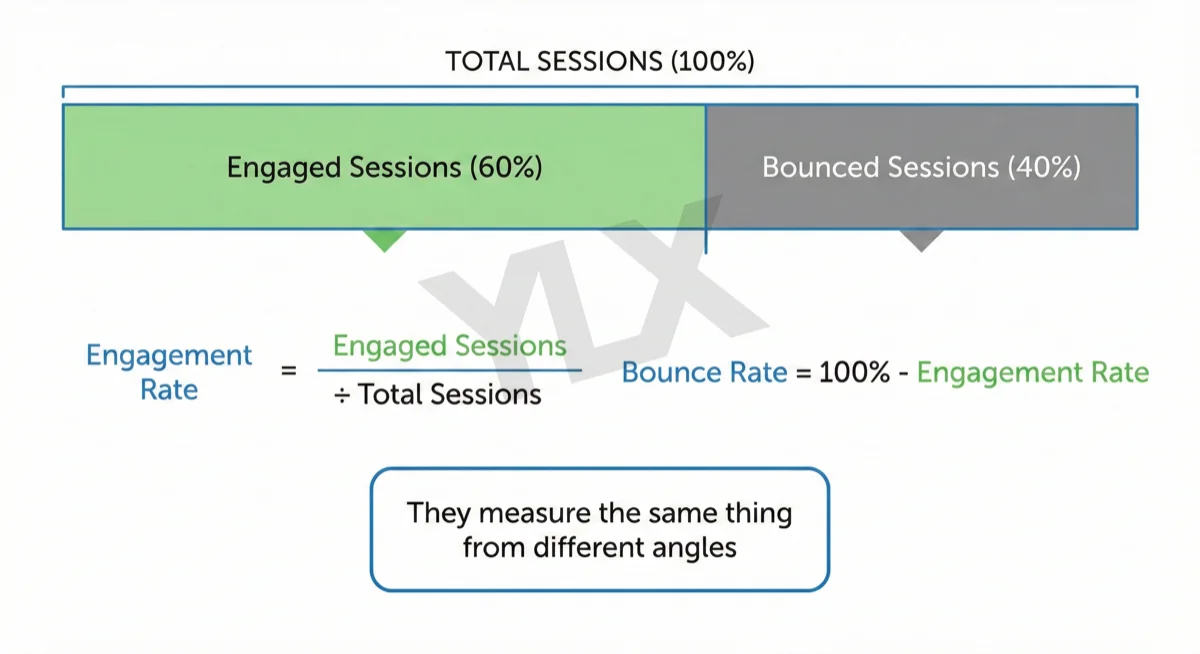
Google Analytics 4 (opens in a new tab) defines bounce rate as the percentage of sessions that were not engaged.
A session counts as engaged if any of these happen:
- the visitor stays longer than 10 seconds
- they view at least two pages
- they complete a conversion
So in GA4, bounce rate is not just "they saw one page."
That matters because a single-page visit is not automatically a bad visit. If someone reads your whole article for several minutes, that is engaged. If someone lands on the page and leaves almost immediately, that is not.
The inverse of bounce rate is engagement rate. If you want the positive side of the same system, our post on what engagement rate means in GA4 goes deeper on that.
Why a High Bounce Rate Is Not Always Bad
The context of the page changes everything.
A blog post often answers a narrow question. If the post delivers the answer quickly and clearly, the visitor may leave satisfied. That is normal.
A contact page can also produce quick exits if the visitor got the phone number, hours, or address they wanted.
On the other hand, a service page, sales page, or checkout page usually has a different job. If visitors leave those pages without engaging, that is more likely to signal friction, confusion, weak intent match, or slow performance.
So before you judge the number, sort the page into its actual role:
- explainer or blog content
- trust or information page
- service or lead-gen page
- commercial comparison page
- checkout or conversion page
The same bounce rate means different things in each case.
That is why page-level interpretation is stronger than sitewide panic. A site average can hide a lot of useful nuance.
What a "Normal" Bounce Rate Looks Like
There is no single benchmark that applies across industries and page types.
That is one reason generic "good bounce rate" tables are often misleading. They collapse too many variables into one number:
- traffic source
- intent
- device mix
- page type
- analytics setup
- whether conversions are configured properly
For example, a blog post can have a relatively high bounce rate and still be performing well if it captures search traffic, holds attention, and supports later conversions. A service page with the same rate may deserve investigation.
The better baseline is your own site:
- Compare similar pages against each other.
- Compare the same page over time.
- Compare bounce rate alongside engagement time, conversion events, and traffic source.
That gives you something actionable. A generic cross-industry table usually does not.
Bounce Rate vs Search Satisfaction
Google has said for years that Analytics bounce rate is not a direct ranking factor.
That does not mean user satisfaction is irrelevant. It means you should not confuse one internal analytics metric with Google's search systems.
What matters in practice is whether the page satisfies the searcher. If the page is slow, mismatched to intent, or unclear enough that people return to search results and keep looking, that is a problem. If the page gives them the answer they came for, that is a good outcome even if the session is short.
This is why bounce rate is a diagnostic metric, not a verdict.
It is also why site owners should be careful about trying to "fix" bounce rate without first defining what success looks like for that page.
The Three Main Reasons Bounce Rate Gets Bad
When bounce rate is a problem, it usually comes from one of three buckets.
1. The page does not match intent
If someone searched for a quick definition and landed on a long, padded essay, they may leave.
If they searched for a practical checklist and got a theory-heavy overview, they may leave.
If they searched for a service in their city and landed on a generic national page, they may leave.
This is usually the first thing to check. Does the page actually fit the job implied by the query?
2. The page is too slow or frustrating
Speed has a direct impact on whether people stick around long enough to engage. Google still cites research showing that slow mobile pages lose visitors fast, and that performance affects how usable the page feels.
If the layout shifts, the buttons are hard to tap, or the page takes too long to load the main content, visitors may leave before they ever evaluate the message.
That is why bounce rate and Core Web Vitals often belong in the same conversation.
3. The page gives no clear next step
Some pages answer the first question well but fail to suggest what the reader should do next.
That can be solved with:
- a relevant internal link
- a next-step checklist
- a related article
- a clear CTA when the page is commercial
Do not force extra clicks just to lower the metric. Give the visitor a real reason to continue.
How to Diagnose Bounce Rate Properly
If a page worries you, look at it with these questions:
What was the visitor probably trying to do?
Start with the query or traffic source. A person from branded search behaves differently from a person arriving through an informational long-tail query.
Traffic source changes interpretation a lot. Paid clicks, email visitors, local branded searches, and broad informational searches often behave very differently even on the same page.
Is the page doing its job?
A service page should build trust and move the visitor toward contact. A blog post should answer the question well. A contact page should make the next action easy.
What do the companion metrics say?
Bounce rate alone is weak. Pair it with:
- engagement time
- conversion rate
- scroll depth if available
- traffic source
- device breakdown
- internal-link clicks
If bounce rate is high but engagement time is strong and conversions exist, the page may be fine. If bounce rate is high and engagement time is weak, you probably have a real issue.
How to Improve Bounce Rate Without Gaming It
The fix is rarely "make people click more."
The fix is usually "make the page more useful."
Match intent faster
Answer the question early. Do not bury the useful part below a long introduction.
Tighten the structure
Use headings that reflect the reader's actual questions. Keep paragraphs short enough to scan on mobile. Put the key points where tired people can find them quickly.
Improve speed and mobile usability
If the page feels annoying on a phone, the metric will reflect that.
Add better internal links
Give the reader the next logical step, not a random suggestion.
Check your conversion setup
If obvious actions are not marked as conversions in GA4, the bounce rate can look worse than the real business outcome.
For example, if a click-to-call action matters on a service page, make sure your analytics setup treats that as meaningful engagement where appropriate.
What to Measure Instead of Obsessing Over Bounce Rate
Bounce rate is useful, but it should never be the only thing you watch.
For most business sites, the stronger questions are:
- are the right pages attracting the right visitors?
- do visitors stay long enough to consume the important content?
- do they contact you, book, call, or move deeper into the site?
- which pages lose people before they get what they need?
That is a better way to use analytics.
Another useful habit is to compare similar pages against each other. If one service page has noticeably worse bounce and weaker engagement than the others, that often gives you a clearer troubleshooting path than comparing everything to a generic benchmark.
The Bottom Line
Bounce rate is not a score for whether your website is good or bad.
It is a clue.
Sometimes that clue points to weak intent match, slow performance, or poor structure. Sometimes it just means the page answered the question quickly and the visitor was done.
The useful way to read it is:
- in context
- alongside other metrics
- with the page's real job in mind
If you do that, bounce rate becomes helpful instead of distracting.
Want to Know How Your Site Performs?
If you're not sure whether your bounce rate reflects a real issue or just normal visitor behaviour, we can review it with you. We'll look at the page intent, analytics setup, speed, and next-step paths, then explain what we find in plain terms.
Get a free website review: Contact us at [email protected]
Analysis FAQ.
What is bounce rate?
In GA4, bounce rate is the percentage of sessions that were not engaged. A session is engaged if the visitor stays longer than 10 seconds, views at least two pages, or completes a conversion.
What is a good bounce rate?
There is no universal good bounce rate. The right benchmark depends on page type, traffic source, device, and what the visitor came to do. A blog post can have a much higher bounce rate than a service page and still be doing its job.
Does bounce rate affect SEO?
Google does not treat bounce rate in Analytics as a direct ranking factor. What matters more is whether the page satisfies the searcher. A page can have a high bounce rate and still be useful if visitors got what they needed.
How can I reduce my bounce rate?
Start by matching the page to search intent, improving speed, making the content easier to scan, and adding internal links that genuinely help the visitor continue.
Tagged with

Further Reading
Related Analysis.
What Is Engagement Rate? The Metric That Shows What Works
Engagement rate measures visitor interaction on your site. Learn what counts as engaged in GA4, what good rates look like, and how to improve yours in 2026.
What Is E-E-A-T? How Google Judges Credibility
E-E-A-T stands for experience, expertise, authoritativeness, and trustworthiness. Learn what Google says and how small business sites can improve it.
Why Core Web Vitals Matter for Your Business Website
Core Web Vitals measure how fast, stable, and responsive your pages feel. Learn what they mean and why they still affect real user experience.