Custom vs Template Websites: What Fits Your Business?
If you are deciding between a template website and a custom one, the wrong question is "which is better?"
The right question is "what does this website need to do for the business?"
Template platforms and custom builds solve different problems. A template can be a sensible choice for a simple launch. A custom site can be the better decision when the website is a real sales, operations, or trust asset.
The mistake is treating them like interchangeable options when they are not.
What a Template Website Actually Is
A template website starts from a pre-built system.
That usually means:
- a hosted platform
- a theme or design framework
- fixed content patterns
- built-in controls for editing, ecommerce, or forms
The upside is obvious. You can move quickly. A lot of the infrastructure is already handled for you. Hosting, security updates, and basic content management are usually simplified.
That makes templates attractive when:
- the site needs to go live quickly
- the budget is limited
- the functionality is straightforward
- the website is mostly informational
For many businesses, that is a real advantage.
What a Custom Website Actually Is
A custom site is not just "more expensive web design."
It means the structure, visuals, and technical setup can be shaped around your actual needs rather than around a platform's default assumptions.
That matters when you need:
- a distinctive visual direction
- tighter control over performance
- more flexible page types
- unusual integrations
- a cleaner content model
- less platform lock-in
Custom does not automatically mean better. It means you have more room to make the right decisions and more responsibility to make them well.
Where Template Sites Win
Templates win on speed and simplicity.
If you are launching a new business and need a credible online presence soon, a strong template can be enough. If the site is functioning mainly as a brochure, portfolio, or temporary first version, a template may be the rational choice.
They also make sense when the business has one or more of these constraints:
- the budget is tight
- the content is limited
- the service offer is simple
- the team needs to manage updates themselves with minimal friction
There is nothing inherently wrong with that.
The problem starts when the site has outgrown the model but the business keeps trying to force the template to do a more demanding job.
Where Template Sites Usually Start to Struggle
Template sites tend to get weaker as the requirements get more specific.
That can show up as:
- layouts that all look broadly the same
- page builders that produce bloated markup
- awkward workarounds for custom functionality
- limited control over technical SEO details
- harder-to-manage performance as plugins or add-ons pile up
This does not happen on every platform or every project. But it is a common path.
A site that begins as "good enough for now" can become expensive in a slower, messier way later if the business keeps layering more onto the same system.
Performance Is About Implementation, Not Just Platform
This is where people often get too absolute.
Template platforms are not automatically slow. Custom sites are not automatically fast.
Modern website builders have improved. Some can produce respectable performance when the design is disciplined and the site stays relatively simple.
At the same time, custom projects can perform badly if they are overengineered, heavy, or poorly built.
So the useful test is not "template or custom?" It is:
- how much control do you need?
- how complex is the page structure?
- how much script and plugin weight is accumulating?
- can the team show real performance results for comparable projects?
If you care about search visibility and user experience, ask for actual evidence. PageSpeed screenshots alone are not enough. Look for real mobile performance, stable layouts, and a site that still behaves well after content and features are added.
That last point matters more than many buyers realize. A homepage demo can look fine on launch day while the real site becomes slower and harder to manage as new pages, apps, scripts, and content get layered in.
SEO Differences Are Usually Indirect
From an SEO perspective, the platform itself is rarely the whole story.
What matters more is whether the site can support:
- fast loading pages
- clear content hierarchy
- strong internal linking
- clean metadata control
- crawlable navigation
- location and service page expansion
- structured data where appropriate
A template can support those basics. A custom build can too. The difference is that custom work usually gives you more freedom when you need to go beyond the platform defaults.
That often becomes important later rather than immediately. A business may launch with simple needs, then gradually need stronger service-page structure, better local content, or more flexible lead flows. That is usually where platform constraints become visible.
That becomes important for businesses investing in:
- local SEO
- content clusters
- multiple service lines
- custom conversion flows
- technical performance improvements
If the site is expected to support content clusters, service-area expansion, or deeper local search structure, architecture matters more than buyers often expect. A platform that makes internal linking, page structure, or performance tuning awkward can quietly limit growth later.
That becomes even more visible when the business starts caring about site speed or conversion performance. If the platform keeps accumulating weight, the problem stops being just about flexibility and starts affecting Core Web Vitals too.
Design and Trust Matter More in Competitive Markets
If your website is competing in a crowded market, sameness becomes a liability.
The issue is not that visitors consciously think, "this is a template." The issue is that interchangeable sites tend to feel lower-commitment, less memorable, and less tailored to the buyer.
That affects trust.
In some industries, that may not matter much. In others, it matters a lot. If the buyer is comparing several providers and the website is doing part of the selling, design quality and specificity carry real weight.
This is especially true when the business sells something that depends on credibility before contact: legal work, higher-ticket services, consulting, healthcare-adjacent services, or anything else where the buyer is assessing competence before reaching out.
That is one of the strongest arguments for custom work. Not because custom is inherently premium, but because it gives you room to build a site that fits the brand, the buyer, and the decision process more precisely.
The Cost Question Is Bigger Than Upfront Price
Templates usually cost less to start. That part is true.
But the long-term cost depends on what you count.
A lower-cost site can still become expensive if it creates:
- slower editing workflows
- limitations that force rebuilds
- plugin or app dependency
- weak conversion performance
- design constraints that hurt trust
A custom site costs more upfront, but it can make more sense when the website is expected to support revenue, not just exist online.
The better question is not "what is the cheapest way to launch?"
It is:
- how important is this site to lead generation or sales?
- how long do we expect to use this architecture?
- what happens if we outgrow it in twelve months?
When a Template Is the Better Decision
Choose a template when most of these are true:
- you need a site live quickly
- the content is relatively simple
- the site is not your primary growth channel yet
- the required functionality is standard
- the business can accept some design and technical constraints
That is a legitimate choice. Not every business needs a custom build on day one.
Sometimes the smartest path is to launch with a disciplined template now, then rebuild later once the business has stronger proof about what the site actually needs to do.
When Custom Is the Better Decision
Custom becomes the stronger option when most of these are true:
- the website plays a serious role in revenue
- your market is competitive online
- your service pages need stronger differentiation
- you need more control over technical SEO and performance
- you expect the site structure to grow
- you need workflows or integrations that templates handle poorly
In those cases, custom work is often less about aesthetics and more about fit.
It can also reduce the long-term cost of workarounds. A business that keeps forcing a template to support custom needs often ends up paying repeatedly in awkward edits, plugin dependency, and eventual rebuild pressure.
Questions to Ask Before Deciding
If you are weighing the two paths, ask:
- What is the website's actual job in the business?
- How much of our future growth depends on search, trust, or conversion performance?
- Are our requirements simple now but likely to expand soon?
- Do we need stronger control over content structure, speed, or integrations?
- Would a generic-looking site put us at a disadvantage in our market?
Those answers matter more than broad internet arguments about which option is "best."
The Bottom Line
Template websites are not bad. Custom websites are not automatically superior.
The right choice depends on the role the site plays.
If you need a fast, simple launch and the site is not carrying heavy strategic weight, a template may be exactly right.
If the site is central to trust, visibility, lead generation, or long-term growth, custom work usually gives you more room to build something that actually fits the business.
That is the real distinction.
Need Help Deciding?
If you're not sure whether your business needs a template launch or a custom build, we can help you think it through. We'll review the role your site needs to play, the constraints that matter, and where a rebuild would actually create value.
Get a free website review: Contact us at [email protected]
Analysis FAQ.
What is the difference between a custom website and a template website?
A template website starts from a pre-built design and platform. A custom website is designed and built around your specific brand, content, and technical requirements. The tradeoff is usually speed and cost versus flexibility and differentiation.
Are template websites bad for SEO?
Not automatically. Modern template platforms can perform well when they are used carefully. The bigger issue is whether the site is slow, bloated, hard to expand, or too constrained to support your content and local-search needs properly.
When should I choose a template website?
Templates make sense when you need to launch quickly, your requirements are simple, and the website is not carrying a heavy lead-generation or integration burden.
When should I invest in a custom website?
Custom development makes more sense when your website drives revenue, your market is competitive, your requirements are specific, or you need stronger control over performance, content structure, and long-term flexibility.
Tagged with

Further Reading
Related Analysis.
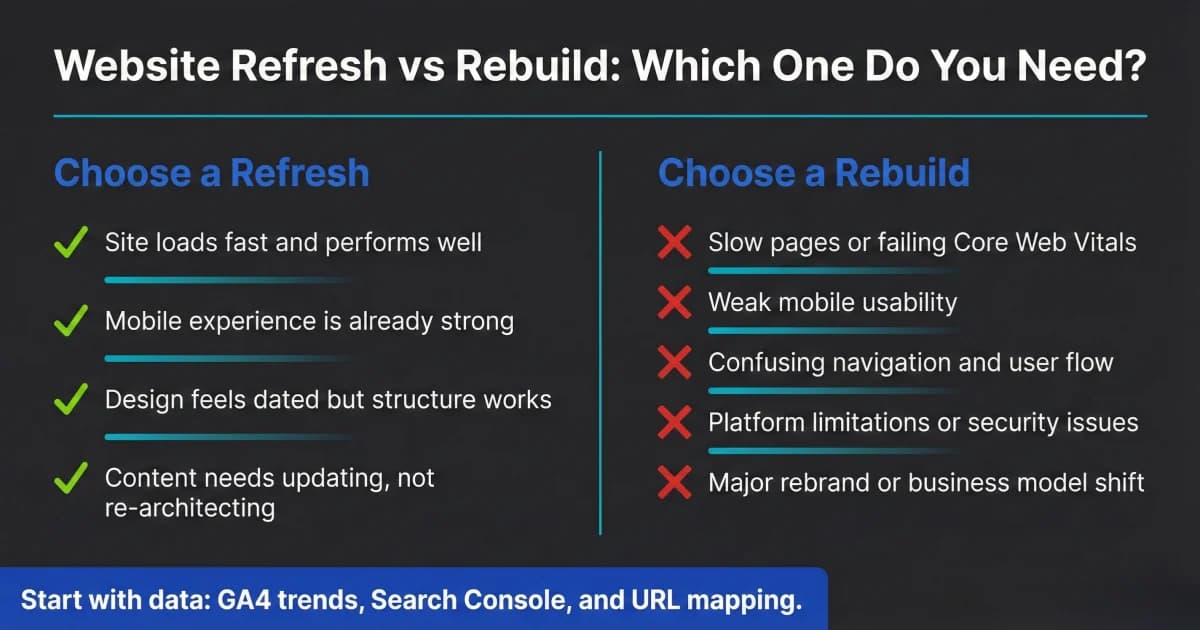
Website Redesign Checklist: Refresh or Rebuild in 2026
Not every website needs a full rebuild. Use this website redesign checklist to decide refresh vs. rebuild, what to prioritize, and how to protect SEO safely.
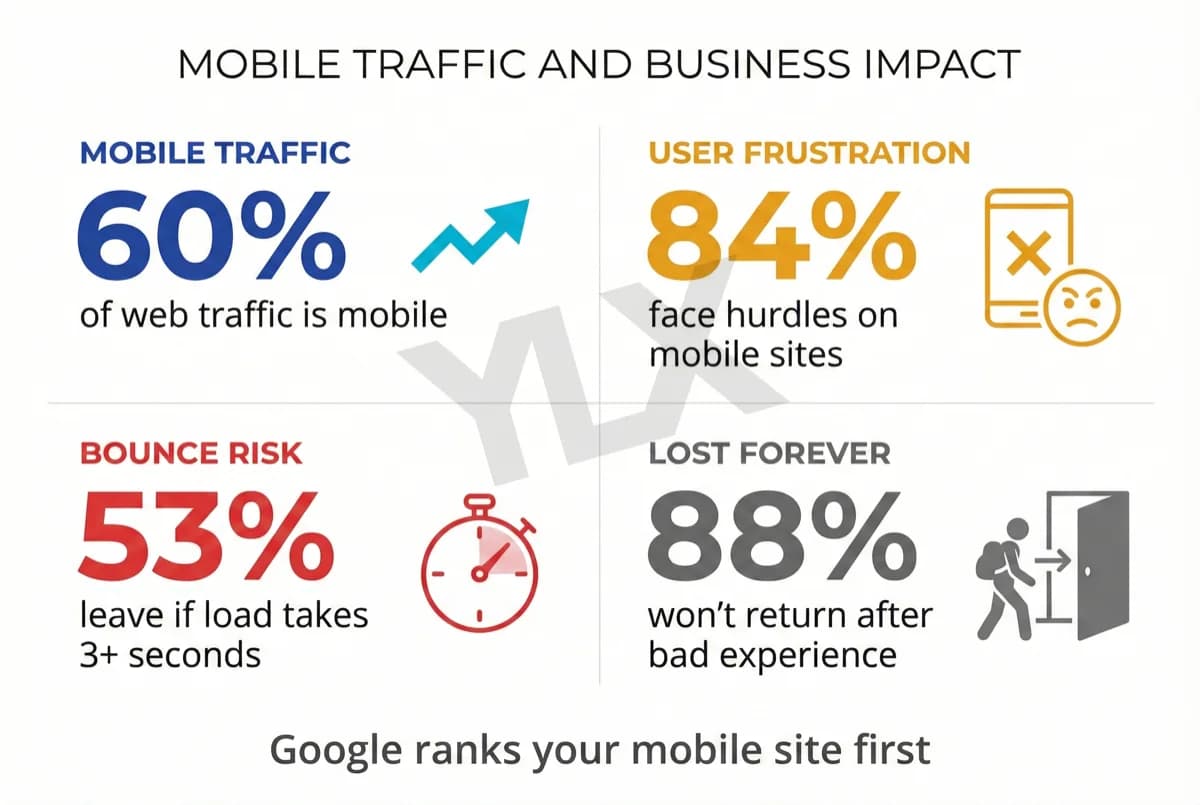
What Is Responsive Design? Why Your Site Must Adapt
Responsive design makes your website work on any screen. With mobile and desktop traffic now close to parity and Google indexing mobile-first, it is a core business requirement.
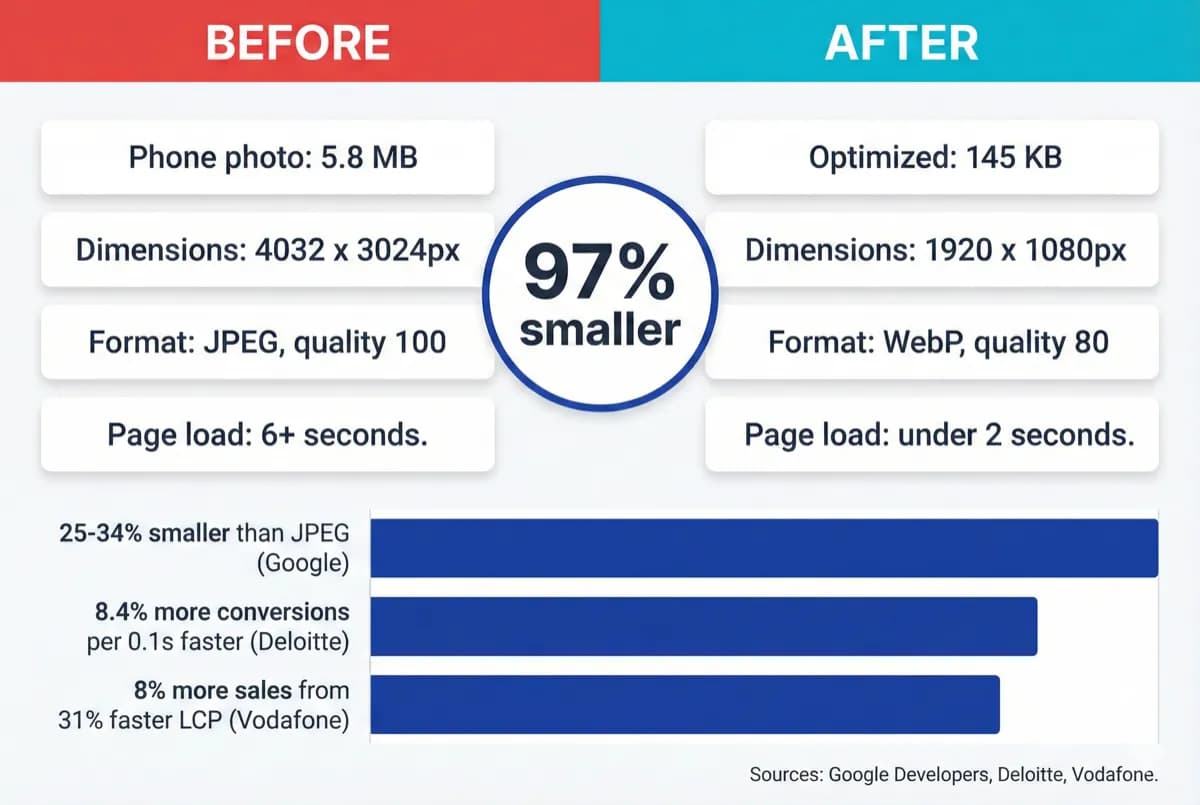
How to Optimize Your Website Images With WebP (2026)
Your website images are probably too large. Learn how to convert to WebP, resize for the web, and serve fast-loading images without visible quality loss.