Service Area Pages: Local SEO Without a Storefront
You serve customers across multiple cities, but you only have one office. Maybe you work from home. Maybe you drive to clients. Either way, when someone in a nearby city searches for what you do, your website doesn't show up because nothing on it mentions their city.
That's the problem service area pages solve. They're dedicated pages on your website that target the specific cities you serve, even when you don't have a storefront there.
This guide explains how to build them correctly. Done right, they bring in local traffic from cities you're already serving. Done wrong, they trigger a Google penalty that buries your entire site.
What Service Area Pages Are
A service area page is a page on your website built for a specific city or region you serve. If you're a plumber in London, Ontario who also takes jobs in Kitchener, Waterloo, and Guelph, you'd create a page for each of those cities.
Each page targets searches like "plumber in Kitchener" or "emergency plumbing Waterloo" by providing genuinely useful content about your services in that specific area.
These pages are different from location pages. A location page represents a physical office or storefront. A service area page represents a place you travel to or serve remotely. The distinction matters because Google treats them differently.
Why This Matters Now
Google has been changing how it handles local searches. Search Engine Land documented a significant shift (opens in a new tab) starting in early 2024: search results for city-specific queries moved from showing generic homepages to showing localized service area pages almost exclusively.
In one documented case, a personal injury lawyer's search results in Altamonte Springs, FL went from predominantly generic pages in November 2023 to almost entirely city-specific service area pages by March 2024. The same pattern has repeated across industries.
This shift means businesses without localized pages are losing organic visibility to competitors who have them.
Here's the other side of the equation. City-specific searches are usually high intent. People searching for a service in a specific city are often close to taking action. If your website doesn't speak to their city, a competitor's will.
Service Area Businesses and Google Business Profile
Google defines a service area business (SAB) as one that "visits or delivers to customers directly but doesn't serve customers at their business address." Plumbers, cleaners, landscapers, web designers, consultants. If you go to the client instead of the client coming to you, Google considers you an SAB.
This creates a specific set of rules for your Google Business Profile. Google's official guidance for service-area and hybrid businesses documents these requirements (Google Business Profile Help (opens in a new tab)):
- You must hide your physical address if you don't serve customers at that location
- You can set up to 20 service areas using cities or postal codes
- Your service area should not extend beyond about a two-hour drive from your base
- Service areas must be defined by specific places (such as cities or postal codes), not a radius
Here's an uncomfortable truth. Sterling Sky's controlled testing (opens in a new tab) found that hiding your address on GBP causes a measurable decline in local pack visibility. In one test, concealing the address caused the Local Pack to disappear entirely for a main keyword. Restoring it brought the pack back.
Google requires SABs to hide their address, but doing so hurts Local Pack performance. That's the tension service area businesses face.
This is exactly why your website matters more as an SAB. You may not dominate the Local Pack in every city you serve, but you can rank in organic results with well-built service area pages. Those organic results are where service area pages earn their value.
Anatomy of an effective service area page showing key elements: title tag with city and service, unique local intro, embedded map, local project photos, city-specific content, reviews, NAP with click-to-call, and schema markup
How to Build Service Area Pages That Work
The difference between a page that ranks and one that gets your site penalized comes down to one question: does this page genuinely help someone in that city?
Start With Your Highest-Value Cities
Don't create pages for every town within driving distance. Start with 3-5 cities that represent your best revenue opportunities. These should be places where you already have clients, where demand is strong, and where you can write authentically about serving that area.
For a business based in London, Ontario, that might mean Kitchener, Waterloo, Cambridge, Guelph, and Stratford before expanding to smaller communities.
Make Each Page Genuinely Unique
This is where most businesses fail. They write one page, duplicate it four times, swap the city name, and hope Google doesn't notice. Google notices.
Google's spam policies (opens in a new tab) define doorway abuse as creating pages "targeted at specific regions or cities that funnel users to one page." That's exactly what city-name-swapped templates are.
Google does not publish a fixed uniqueness percentage for service area pages. In practice, aim for a substantial city-specific section on every page. Many teams use 30-40% unique content as a working target.
Here's what makes content unique to a city:
Local project examples. If you've done work in Kitchener, show it. Before-and-after photos, project descriptions, outcomes. Real work in real locations.
City-specific details. Reference local conditions that affect your work. For a web designer, that might mean local business regulations, industry makeup, or competitive landscape. For a contractor, it's building codes, climate considerations, or common housing stock.
Testimonials from that area. A review from a Waterloo client on your Waterloo page is more relevant than a generic testimonial.
Local landmarks and context. Not forced keyword stuffing, but natural references that show you actually know the area. "Serving businesses from uptown Waterloo to the university district" reads differently than "We provide services in Waterloo, Ontario, Canada."
Embedded Google Map showing your service coverage for that city.
Structure Each Page for Search and Users
Every service area page needs these elements:
Title tag: Include the city and your primary service. "Web Design in Kitchener, ON" not "Our Services." Keep it under 60 characters.
H1 heading: Match the search intent. "Web Design Services in Kitchener" works better than clever headlines nobody searches for.
Your services in that area. Explain what you offer, but frame it for that specific city. What problems do businesses in Kitchener face? What makes your approach relevant there?
Contact information. Your full NAP (Name, Address, Phone) must be consistent with every other listing. Include a click-to-call phone number and a clear call to action.
Schema markup. Use the areaServed property on your LocalBusiness or Service schema to tell Google exactly which city this page covers. We covered implementation details in our schema markup guide.
URL Structure
Keep URLs clean and descriptive. Good patterns:
/web-design-kitchener/services/kitchener/areas/kitchener-waterloo
Avoid burying service area pages behind widgets or store locators that search engines can't crawl.
The Doorway Page Line
Google published doorway page guidance in 2015 (opens in a new tab) with practical questions to help site owners evaluate risk. Those questions are still useful:
- Is the page meant to rank on generic terms even though its content is very specific?
- Does the page duplicate content that already exists elsewhere on your site?
- Does the page exist as an "island" with no links from other parts of your site?
- Is the page an integral part of your site's experience, or just a funnel?
If your service area pages fail any of these tests, they need work.
Side-by-side comparison of a doorway page versus a legitimate service area page, showing the differences in content uniqueness, local details, photos, navigation, and Google penalty risk
The distinction is straightforward. A doorway page exists to rank. A service area page exists to serve visitors from that city. Google can tell the difference.
Google's spam and core systems continue to target scaled, thin, low-value pages (spam updates (opens in a new tab), core updates (opens in a new tab)). If you're using AI to generate dozens of nearly identical city pages, you're increasing risk under both systems.
Internal Linking Strategy
Service area pages can't exist as islands. They need to be woven into your site's navigation.
If you serve 10 or fewer cities, link directly from a "Cities We Serve" or "Areas We Serve" section in your main navigation.
If you serve more than 10, create a hub page (like "/areas-we-serve") that links to every city page. Link that hub from your main navigation and footer.
Every service area page should link to:
- Your main services page
- Your contact page
- Related blog content (like this post)
- Other nearby service area pages where it makes sense
Your blog posts should link to relevant service area pages too. A post about local SEO naturally connects to your service area pages. A post about local citations does too. These contextual links reinforce the relevance of each page.
Link your Google Business Profile to the most relevant service area page for your primary city, not just your homepage.
What Canadian Businesses Should Know
Ontario is a big province. A business in London can realistically serve Kitchener (100 km), Guelph (130 km), and Stratford (60 km). Toronto (190 km) is a stretch. Google's two-hour driving guideline applies.
Use city-level targeting on GBP. Google says service areas should be set using specific places (such as cities or postal codes), and that your overall boundary should stay within about a two-hour drive from your base (Google Business Profile Help (opens in a new tab)). For your website, a province-level hub page ("/web-design-ontario") linking to city-specific pages is still a valid strategy.
Canadian directories matter. Your citation profile should include Canadian-specific directories and your local Chamber of Commerce.
Listings on platforms like YellowPages, Canada411, and 411.ca reinforce the geographic relevance of your service area pages.
Bilingual considerations. If you serve eastern Ontario (Ottawa, Cornwall) or have Quebec clients, bilingual content may be worth the investment. Separate French-language pages with proper hreflang tags are the correct approach, not machine-translated blocks on English pages.
Common Mistakes
Copy-paste with city names swapped. The most common and most dangerous mistake. Google's SpamBrain system catches this. Every page needs genuinely unique content.
Creating pages for cities you can't serve. If you're in London, Ontario and you create a page targeting Vancouver, you have no credibility. Stick to your realistic service area.
Keyword stuffing. Mentioning "Kitchener" 47 times on a page doesn't help. It hurts. Use the city name naturally where it fits.
No conversion elements. Pages built only to rank with no phone number, no contact form, and no call to action are wasted effort. Every page should make it easy to hire you.
Orphaned pages. If your service area pages aren't linked from your navigation, footer, or sitemap, Google considers them islands. That's one of Google's explicit doorway page signals.
Set and forget. Service area pages need periodic updates. Add new project photos, update testimonials, refresh city-specific details. Stale pages lose relevance over time.
Measuring What Works
Once your pages are live, track their performance in Google Search Console (opens in a new tab):
- Which city-specific queries are driving impressions?
- What's the click-through rate for each page?
- Are pages getting indexed?
If a page isn't getting indexed, it might be too similar to another page on your site. If it's indexed but not ranking, the content may not be unique or relevant enough for that city.
Watch for the queries that bring visitors. "Web design Kitchener" is what you're targeting, but you might discover that "affordable websites Kitchener" or "Kitchener business website" drives more traffic. Use those insights to refine your content.
The Bottom Line
Service area pages help businesses rank in cities they serve but don't have offices in. Google has shifted local search results to favor these localized pages over generic homepages.
The rules are clear:
- Each page needs substantial unique content for that specific city
- Include real local details: project photos, testimonials, area-specific information
- Link pages into your site navigation. Orphaned pages look like spam
- Start with 3-5 high-value cities and expand once those pages perform
- Stay within your realistic service area. Google's guideline is a two-hour drive
Your competitors probably haven't built these pages yet. That's your opportunity.
Need Help With Service Area Pages?
If you're not sure how to structure service area pages for your business, or whether your current ones might be flagged as doorway pages, we can take a look. We'll review your site, check your local search presence, and explain what we find in plain terms.
Get a free local SEO review: Contact us at info@ylx.ca
Analysis FAQ.
What is a service area page?
A service area page is a dedicated page on your website targeting a specific city or region you serve but don't have a physical office in. It helps you rank in local search results for that area. Each page must contain unique, location-specific content to avoid being flagged as a doorway page by Google.
How many service area pages should I create?
Start with 3-5 pages targeting your highest-revenue cities. Only create a page for a city you can realistically serve within a two-hour drive, which is Google's guideline for maximum service radius. Quality matters more than quantity. A few strong pages outperform dozens of thin ones.
What is the difference between a service area page and a doorway page?
A service area page provides genuine value to visitors in that specific city with unique local content, project photos, testimonials, and relevant details. A doorway page is the same template with city names swapped. Google can treat doorway-style pages as spam. Google does not publish a required uniqueness percentage, but each page should include substantial location-specific content.
Can I rank in cities where I don't have a Google Business Profile?
Yes. Service area pages target organic search results, not the Local Pack. Google increasingly favors localized pages in organic results for city-specific searches. Sterling Sky documented cases where service area pages drove significant organic traffic in cities without any GBP listing.
Tagged with

Further Reading
Related Analysis.
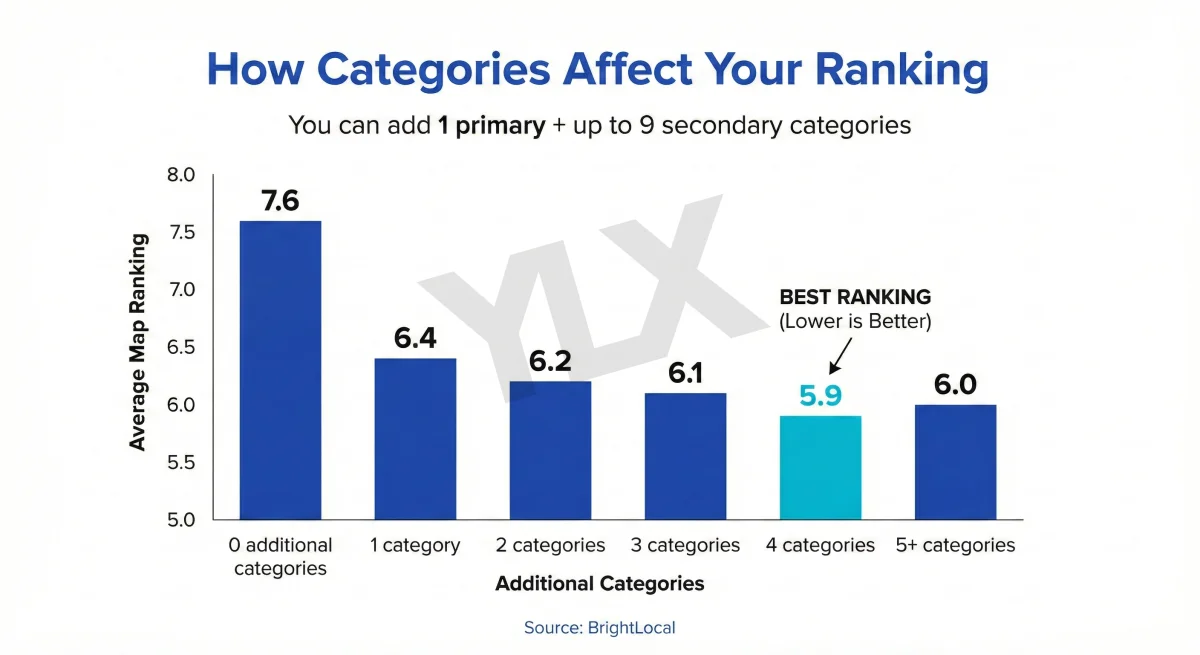
How to Optimize Your Google Business Profile (2026 Guide)
Your Google Business Profile is often the first thing customers see. Learn what actually affects your ranking and how to set up your profile correctly.
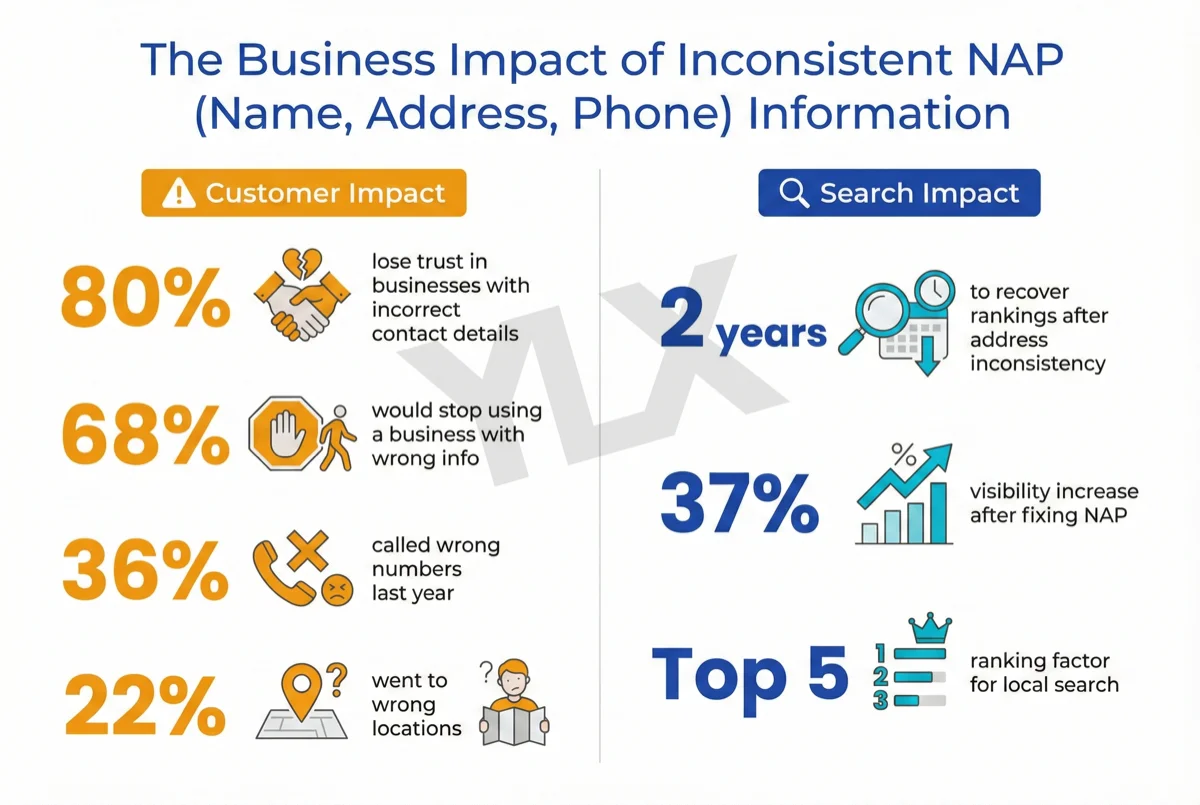
What Is NAP? Why Your Business Info Must Match Everywhere
NAP is your Name, Address, and Phone number. When it varies across the web, search engines and customers lose trust. Learn how to audit and fix it correctly.
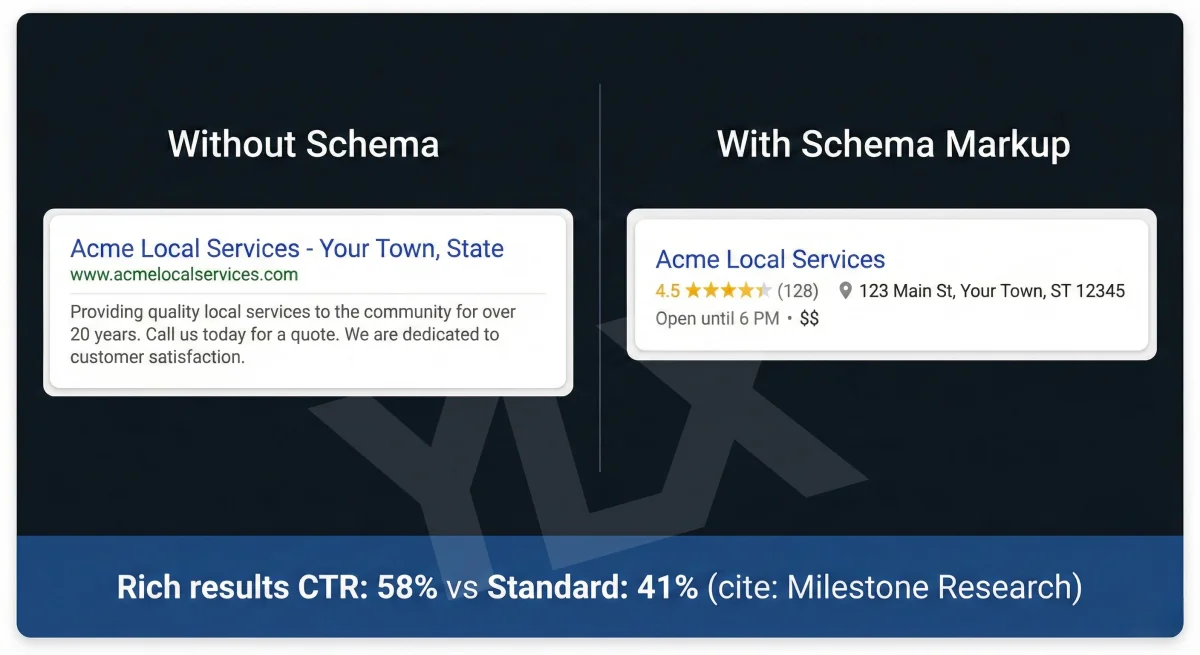
What Is Schema Markup? Structured Data for Local Business
Schema markup helps Google understand your business. Learn what it is, what properties matter, and how to add structured data to your local business website.