Cookie Consent for Canadian Websites: What You Actually Need
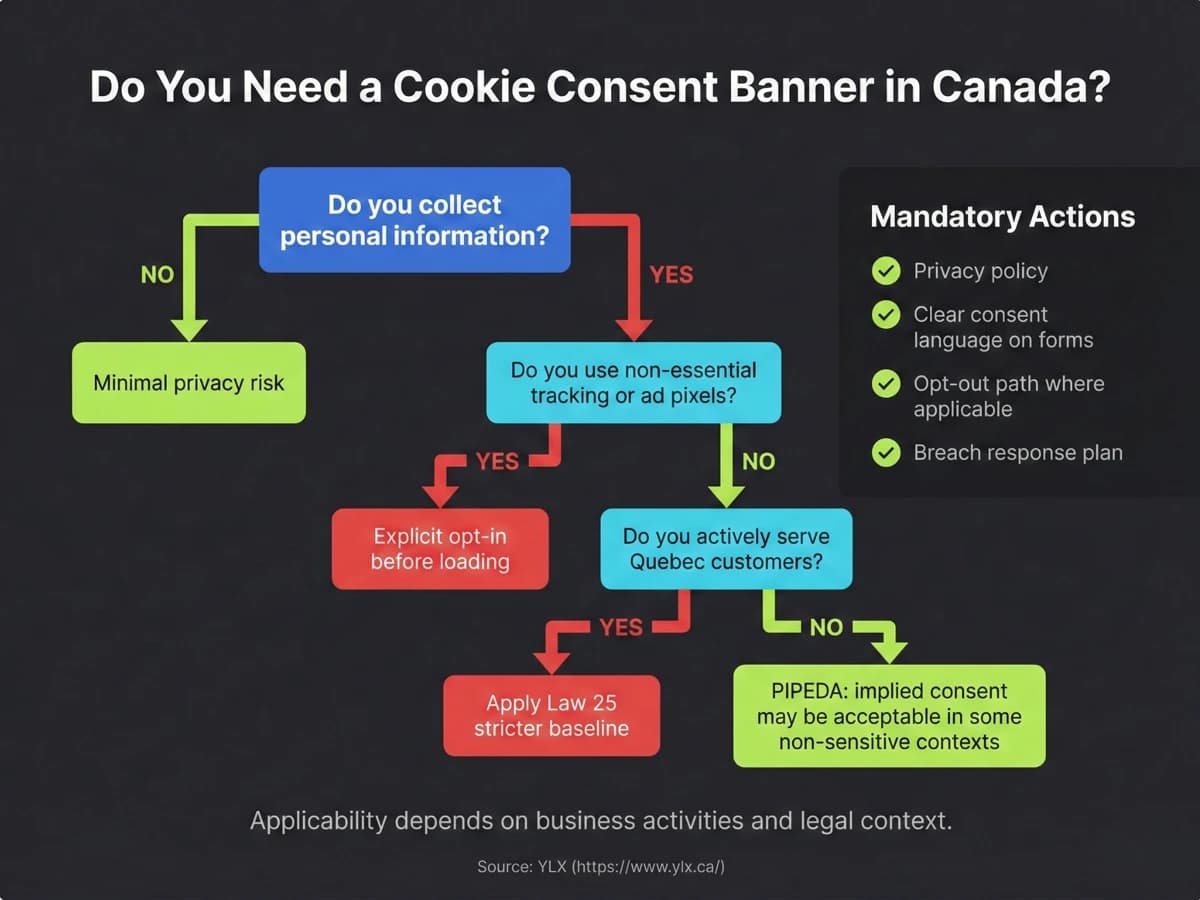
You've probably seen advice telling you that your website needs a cookie consent banner. Maybe it does. Maybe it doesn't. The answer depends on what scripts your site runs, what data they collect, and who visits your site.
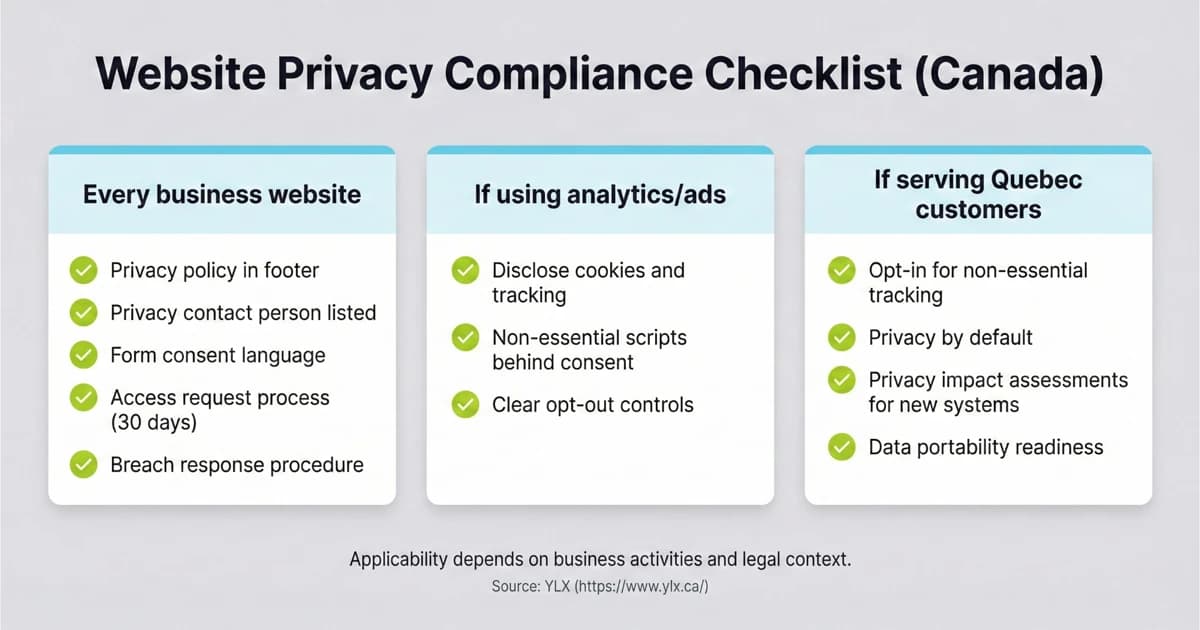
We covered when Canadian privacy law applies to your website in our guide to website privacy law in Canada. Our post on writing a privacy policy explains what your policy should disclose about cookies. This post is the practical next step: deciding whether you need a cookie banner, choosing a tool, and setting it up without irritating visitors.
When You Need a Cookie Banner (and When You Don't)
Start with what your website is actually doing in the background. Every script that loads on your site can collect data. The real question is what data it collects and how that data is used.
Under PIPEDA (Federal, Including Ontario)
PIPEDA (Personal Information Protection and Electronic Documents Act) is the federal privacy law covering Ontario. The Office of the Privacy Commissioner (OPC) published guidelines on online behavioural advertising (opens in a new tab) that explain when implied consent is acceptable and when express opt-in is needed. Here's the short version:
Implied consent is generally acceptable when:
- You use first-party analytics (like Google Analytics with anonymized IPs) for understanding how people use your site
- Your privacy policy clearly explains what cookies you use and why
- You give visitors a way to opt out
- The data collected is not sensitive (no health, financial, or children's data)
Express opt-in consent is required when:
- You use advertising trackers that follow visitors across other websites
- You share visitor data with third parties for their own purposes (instead of only providing a service to you)
- You collect sensitive personal information through tracking
The OPC's Home Depot investigation (PIPEDA Findings #2023-001) (opens in a new tab) is a clear example. Home Depot shared customer email and purchase data with Meta through ad-measurement tools without meaningful consent. The Privacy Commissioner found the company's privacy policy too vague to count as valid consent and recommended express opt-in for similar practices.
Under Quebec Law 25
If your business serves Quebec customers and collects their personal information, the rules are stricter. Quebec's Act respecting the protection of personal information in the private sector (Law 25) (opens in a new tab) sets the baseline. Section 8.1 requires upfront notice when technology can identify, locate, or profile a person, and section 12 restricts secondary use without consent.
Law 25 has been fully in force since September 2024. The requirements include:
- Opt-in consent before non-essential cookies load (the common compliance baseline)
- Clear information about what each cookie does, provided before consent
- The ability for visitors to change their preferences at any time
- Documentation of consent received
Penal fines under Law 25 can reach $25 million or 4% of global turnover, whichever is higher.
Quick Decision Framework
Here's a practical way to decide what you need:
- List every third-party script on your site. Google Analytics, Meta Pixel, Google Ads, chat widgets, embedded videos, social share buttons. Each one may set cookies.
- Classify each script. Is it essential for the site to work (like a payment processor), or is it for analytics, advertising, or personalization?
- Check who you serve. Ontario only? All of Canada including Quebec? International visitors too?
If your site runs only basic analytics and you disclose it in your privacy policy, a banner may not be legally required under PIPEDA. But if you have any advertising or cross-site tracking scripts, or if you serve Quebec visitors, you need a consent mechanism.
What a Consent Banner Actually Does
Most business owners think of cookie consent as an annoying popup. That's only the visible part. What matters is what happens behind the scenes.
A properly built consent banner does one main thing: it controls which scripts load on your website based on what the visitor agrees to.
When someone first visits your site, no tracking scripts run. The consent tool holds them back. The visitor sees the banner and makes a choice.
If they accept all cookies, every script loads normally. If they only accept necessary cookies, the analytics and advertising scripts stay blocked. If they accept analytics but not advertising, only the analytics scripts load.
This is called conditional script loading. The consent tool sits between your visitor and the third-party scripts on your site.
This matters because simply showing a banner while loading all scripts anyway does nothing useful. If your site fires a Meta Pixel the moment someone arrives, a consent popup that appears two seconds later doesn't undo the data already collected. The scripts need to wait for permission.
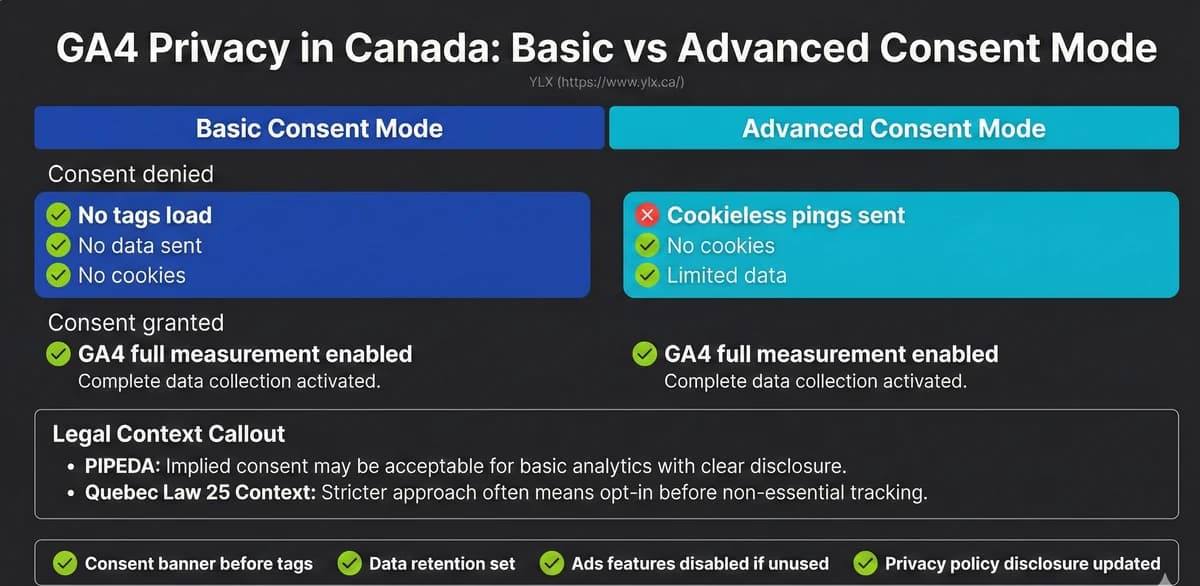
Google Consent Mode works with this approach. According to Google's consent mode documentation (opens in a new tab), Google tags can adjust their behaviour based on a visitor's consent status. Our post on Google Analytics privacy in Canada explains consent mode setup in detail. If consent is denied, tags send limited cookieless data instead of full measurement data. This lets you keep some basic traffic insights without tracking individuals who haven't opted in.
Consent Tools Compared
You don't need to build a consent system from scratch. Several tools handle the banner, script blocking, and consent storage for you. Here's an honest comparison of the most common options as of early 2026.
Cookie consent tool comparison showing Cookiebot, CookieYes, Osano, and custom-built options with their free tier limits, starting prices, and key trade-offs for Canadian business websites
| Cookiebot | CookieYes | Osano | Custom-Built | |
|---|---|---|---|---|
| Free Tier | 50 pages | 100 pages, 5K views/mo | 5K visitors/mo | N/A |
| Starting Price | $8/mo | $10/mo | $199/mo | Dev cost |
| Auto Cookie Scan | Yes | Yes | Yes | No |
| Script Blocking | Yes | Yes | Paid only | Yes |
| Google Consent Mode | Yes | Yes | Yes | Manual |
| Best For | Mid-size sites | Small businesses | Compliance-heavy | Performance-focused |
Cookiebot (by Usercentrics)
Cookiebot (opens in a new tab) automatically scans your site, identifies cookies, and categorizes them. Its auto-scan is the main draw — it finds cookies you didn't know about.
- Free tier: Up to 50 subpages on one domain
- Paid plans: $8/month (Lite) to $96/month (Extra Large, 7,000+ pages)
- Strengths: Automatic cookie scanning, 47+ languages, supports PIPEDA and Law 25 compliance modes
- Limitations: The free tier caps at 50 pages, which most business sites outgrow quickly. Auto-scanning can occasionally miscategorize scripts.
CookieYes
CookieYes (opens in a new tab) has the most generous free plan — up to 100 pages and 5,000 pageviews per month — which is why many smaller businesses start here.
- Free tier: Up to 100 pages, 5,000 pageviews per month
- Paid plans: $10/month (Basic, 600 pages) to $55/month (Ultimate, unlimited pageviews)
- Strengths: Easier setup for non-technical users, Google Consent Mode support, WordPress plugin available
- Limitations: Free tier includes CookieYes branding on the banner. Custom branding and advanced geo-targeting require paid plans. Extra pageviews cost $0.30 per 1,000.
Osano
Osano (opens in a new tab) is a broader privacy compliance platform, not just a cookie tool. It includes data subject request handling and privacy policy templates.
- Free tier: One domain, up to 5,000 monthly visitors
- Paid plans: From $199/month (Plus plan)
- Strengths: Data subject request tools, privacy policy templates, and a "No Fines" pledge on paid plans
- Limitations: The jump from free to $199/month is steep — hard to justify for most small business sites. The free tier doesn't include automated script blocking or consent storage.
Custom-Built Solutions
A developer can build conditional script loading directly into your site without a third-party tool. This means writing code that checks a visitor's stored preference and only loads approved scripts.
- Cost: Part of your web development project (no ongoing subscription)
- Strengths: No third-party dependencies, no branding, no pageview limits, fastest performance
- Limitations: Requires a developer to maintain. No automatic cookie scanning. You're responsible for keeping the setup current as your scripts change.
This is the approach we use most often. Most consent banners we audit are just decoration — the scripts fire before the banner even loads.
Which One Should You Pick?
For most small to medium Canadian business websites, CookieYes offers the best starting point. The free tier covers sites with moderate traffic, and the paid plans are affordable. If you need broader compliance features or handle large volumes of data requests, Osano's paid plan may be worth the cost. If your developer is comfortable with the technical work, a custom solution avoids ongoing subscription fees entirely.
No tool is perfect. Every third-party consent tool adds its own script to your site, and that script has to load before it can block anything else. These tools can also slow your page slightly. Those are trade-offs to understand, not reasons to skip consent.
Cookie Banner Design That Works
A consent banner that frustrates visitors defeats the purpose. Good design gives people a real choice without getting in the way.
What Good Consent UX Looks Like
Give clear, equal options. The accept and reject buttons should be the same size, visual weight, and placement. A bright green "Accept All" beside a tiny grey "Manage Preferences" link is a dark pattern. In December 2024, France's data protection authority, the CNIL, issued formal notices to website publishers (opens in a new tab) for making acceptance more prominent than rejection.
Use plain language. "We use cookies to track which pages you visit so we can improve our site" is better than "This website employs cookies to enhance your browsing experience and improve our digital platform."
Keep it short. The banner itself should be a few sentences with two or three buttons. Put the detailed explanation on a preferences page or your privacy policy.
Don't use a full-screen wall. A bottom bar or corner popup lets visitors see the page content while deciding. Blocking the entire screen until someone clicks feels coercive.
Common Dark Patterns to Avoid
These design tricks violate the spirit of consent law, and regulators are paying attention:
- Pre-checked boxes for non-essential cookies (the visitor should opt in, not opt out)
- Hidden reject options buried behind "Manage Preferences" when Accept is one click away
- Confusing language like "Reject non-essential purposes" instead of a clear "Reject" button
- Color manipulation where Accept is a bright button and Reject is unstyled text
- Repeated prompting that asks again after a visitor already declined
The CNIL's enforcement action found that some sites presented the accept option multiple times in a banner while offering rejection only once, using vague wording. Sites had one month to fix their banners or face penalties.
Canada's privacy regulator has also published guidance on deceptive design patterns (opens in a new tab) and meaningful consent under PIPEDA. The same principle applies here: if consent is manipulated, it is not meaningful.
Setting Up Cookie Consent: A Checklist
If you've decided your site needs a consent banner, here's a numbered checklist you can hand to your developer or agency.
1. Audit your current scripts
Run a full inventory of every third-party script loading on your site. Tools like Cookiebot's scanner can help, or your developer can check the network tab in browser developer tools. Document each script, what cookies it sets, and what data it collects.
2. Classify each script
Sort scripts into categories:
- Necessary: Payment processing, security features, basic site functionality
- Analytics: Google Analytics, Plausible, Fathom, or similar
- Marketing/Advertising: Meta Pixel, Google Ads, LinkedIn Insight, remarketing tags
- Preferences: Language selection, display preferences
3. Choose your consent tool
Pick a consent management platform based on your site size, budget, and technical requirements. See the comparison above.
4. Set up conditional loading
Configure your consent tool so that analytics and marketing scripts only load after a visitor grants consent. Test this by declining all cookies and verifying that no tracking scripts fire. Your developer can confirm this using browser developer tools.
5. Set up Google Consent Mode (if applicable)
If you use Google Analytics or Google Ads, configure Google Consent Mode (opens in a new tab) so Google tags adjust their behaviour based on consent status. This lets you keep basic aggregate data even when visitors decline tracking.
6. Update your privacy policy
Make sure your privacy policy lists every cookie category, explains what each category does, names the third parties involved, and describes how visitors can change their preferences. Our guide to writing a privacy policy covers this section in detail.
7. Test the full flow
Test every consent scenario: accept all, reject all, accept some categories, and change preferences after the initial choice. Verify that scripts actually stop loading when consent is withdrawn.
8. Document your setup
Record which scripts are in each category, what consent tool you're using, and how preferences are stored. This documentation helps if you ever face a complaint or need to update your setup.
What We Build
At YLX, we take a minimal-tracking approach. The sites we build start with no unnecessary third-party scripts. If a client needs analytics, we set up conditional loading so tracking only runs after consent. If they don't need advertising trackers, we don't add them.
This approach means many of our clients' sites don't need a cookie banner at all, because there's nothing to consent to beyond what's disclosed in the privacy policy.
When a client does need consent management, we often build it directly into the site instead of relying on a third-party tool. This keeps the site fast, avoids subscription costs, and gives us full control over how scripts load. We covered related security practices in our guide to essential security features for business websites.
The Bottom Line
Cookie consent in Canada isn't one-size-fits-all. If your website only uses basic analytics and your privacy policy explains it, PIPEDA doesn't require a consent banner. If you run advertising trackers or serve Quebec visitors, you need one.
When you do need a consent banner, the important part isn't the popup itself. It's the conditional script loading behind it. Scripts that fire before consent is given make the banner meaningless.
Pick a consent tool that fits your budget and site size, design the banner with equal-weight accept and reject options, and test that scripts actually stop when visitors say no.
This post is educational information, not legal advice. Privacy requirements depend on your specific business, the data you collect, and the jurisdictions you serve. For legal interpretation of your obligations, consult a qualified privacy lawyer.
Need Help With Cookie Consent?
If you're not sure what your website is tracking or whether you need a consent banner, we can take a look. We'll check what scripts are running on your site and explain what we find in plain terms.
Get a free cookie consent review: Contact us at info@ylx.ca
{/* Image prompt: Create a comparison infographic for a blog post about cookie consent tools for Canadian websites.
Brand attribution: include YLX (https://www.ylx.ca/) naturally as a small source/credit line in the layout (not a watermark).
Style:
- Dark zinc background (#27272a)
- Inter font family only
- Bold white headings, regular weight zinc-300 (#d4d4d8) body text
- Blue (#1e40af) for primary accents, cyan (#06b6d4) for secondary
- Green checkmarks (#84cc16) for positive items, red X marks for negative
- Clean, minimal layout with generous spacing
- No decorative borders or gradients
Content:
- Title: "Cookie Consent Tools Compared"
- Four columns: Cookiebot, CookieYes, Osano, Custom-Built
- Rows: Free Tier (50 pages / 100 pages + 25K views / 5K visitors / N/A), Starting Price ($8/mo / $10/mo / $199/mo / Dev cost), Auto Cookie Scan (checkmark / checkmark / checkmark / X), Script Blocking (checkmark / checkmark / paid only / checkmark), Google Consent Mode (checkmark / checkmark / checkmark / manual), Best For (Mid-size sites / Small businesses / Compliance-heavy / Performance-focused)
- Small footer note: "Pricing as of February 2026"
Dimensions: 1200x630px */}
Analysis FAQ.
Does my Canadian website need a cookie banner?
It depends on what your site does. If you only use basic analytics and disclose it in your privacy policy, PIPEDA generally allows implied consent. If you run advertising trackers or serve Quebec visitors, you likely need an explicit opt-in cookie banner.
What is the difference between implied and express consent?
Implied consent means a user agrees by continuing to use your site after being informed. Express consent requires the user to take a specific action, like clicking Accept, before tracking starts. PIPEDA allows implied consent for non-sensitive data. Quebec Law 25 generally requires express consent for non-essential cookies.
How much does a cookie consent tool cost?
Free tiers exist for small sites. Cookiebot is free for up to 50 pages, CookieYes for up to 100 pages and 5,000 pageviews per month, and Osano for up to 5,000 monthly visitors. Paid plans range from about $8 to $200 per month depending on site size and features.
Does Quebec Law 25 apply to Ontario businesses?
It can, if you actively serve Quebec customers and collect their personal information. The law requires express consent before using non-essential cookies or tracking tools for anyone whose data you collect in a Quebec context.
Tagged with

Further Reading
Related Analysis.
Website Privacy Law in Canada: A Guide for Business Owners
PIPEDA governs how Canadian websites handle personal data. Learn what your site needs for compliance, when cookie consent applies, and how Quebec Law 25 works.
Bill C-27 Failed: What Canadian Businesses Do Next
Bill C-27 is dead. Learn what still applies under PIPEDA, where Quebec Law 25 raises compliance risk, and what your business website should change this quarter.
Google Analytics Privacy in Canada: Is Your Setup Compliant?
GA4 is on most business websites, but most setups need changes for Canadian privacy law. Learn how to configure Google Analytics for PIPEDA and Law 25.