AODA Website Accessibility Rules for Ontario Businesses
You've probably heard the term AODA at some point. Maybe it came up in an email about compliance reports. Maybe a vendor pitched you an "accessibility widget" that promises to handle everything. Maybe you're just trying to figure out if your website needs to change.
Here's the short answer: if your Ontario business has 50 or more employees, your website is legally required to meet accessibility standards. If you have 20 or more employees, you need to file a compliance report by December 31, 2026. If you have fewer than 20, you still have AODA obligations, just not for your website specifically.
Let me break down what the law actually requires and what you should do about it.
What AODA Is
AODA (Accessibility for Ontarians with Disabilities Act) is an Ontario law passed in 2005 with the goal of making the province fully accessible by 2025 (AODA statute (opens in a new tab)).
That deadline came and went. Ontario missed it (opens in a new tab). The province's own independent reviewer described the state of accessibility as a crisis. But the law still stands, the requirements are still in force, and compliance reporting deadlines are approaching.
AODA covers much more than websites. It sets standards across five areas: customer service, information and communications, employment, transportation, and the built environment. The website accessibility requirements fall under the information and communications standard, specifically Section 14 of the Integrated Accessibility Standards Regulation (opens in a new tab).
Who Must Comply (And With What)
This is where most AODA content gets confusing. Different obligations kick in at different sizes:
Ontario's accessibility laws overview (opens in a new tab), website accessibility guidance (opens in a new tab), and compliance reporting page (opens in a new tab) break this down.
All organizations with 1+ employees must:
- Meet customer service accessibility standards
- Train staff on AODA requirements and the Ontario Human Rights Code
- Provide accessible formats and communication supports when requested
- Keep records of training (who was trained and when)
Organizations with 20+ employees must also:
- File an accessibility compliance report every three years
- Next deadline: December 31, 2026
Organizations with 50+ employees must also:
- Make their websites conform to WCAG 2.0 Level AA
- Develop a written accessibility policy and multi-year accessibility plan
- Post that plan on their website
- Update the plan at least every five years
Designated public sector organizations (municipalities, hospitals, school boards, colleges, universities) have the same requirements as large organizations, with compliance reports due every two years instead of three.
The website requirement applies to content published after January 1, 2012. Content published before that date is exempt, though you must still provide it in accessible formats if someone requests it.
| Organization size | Website requirement | Reporting requirement |
|---|---|---|
| 1 to 19 employees | No website WCAG mandate under AODA | No regular compliance report |
| 20 to 49 employees | No website WCAG mandate under AODA | File accessibility compliance report every 3 years |
| 50+ employees | Website must meet WCAG 2.0 Level AA (with listed exceptions) | File accessibility compliance report every 3 years |
The December 2026 Compliance Report
If your organization has 20 or more employees, you need to file an accessibility compliance report by December 31, 2026. This is part of a three-year cycle. The Ontario government's reporting page (opens in a new tab) has the details.
The report is a self-certification. You confirm that your organization has met its current AODA requirements across customer service, information and communications, employment, and other applicable standards. Ontario currently requires designated public sector organizations to file through its Accessibility Compliance Reporting Portal, while businesses and non-profits use the form-based process described on the same reporting page.
Filing the report does not mean the government has audited or verified your compliance. It means you've declared that you're meeting the requirements. You can still face enforcement action or Human Rights Tribunal complaints after filing.
What WCAG 2.0 Level AA Means for Your Website
AODA requires WCAG 2.0 Level AA compliance, with exceptions for live captions and pre-recorded audio descriptions. WCAG (Web Content Accessibility Guidelines) is an international standard for building websites that work for people with disabilities.
We wrote a guide on what WCAG is and how it works that covers the technical details: the four core principles, the most common failures, how to test your site, and what to fix first.
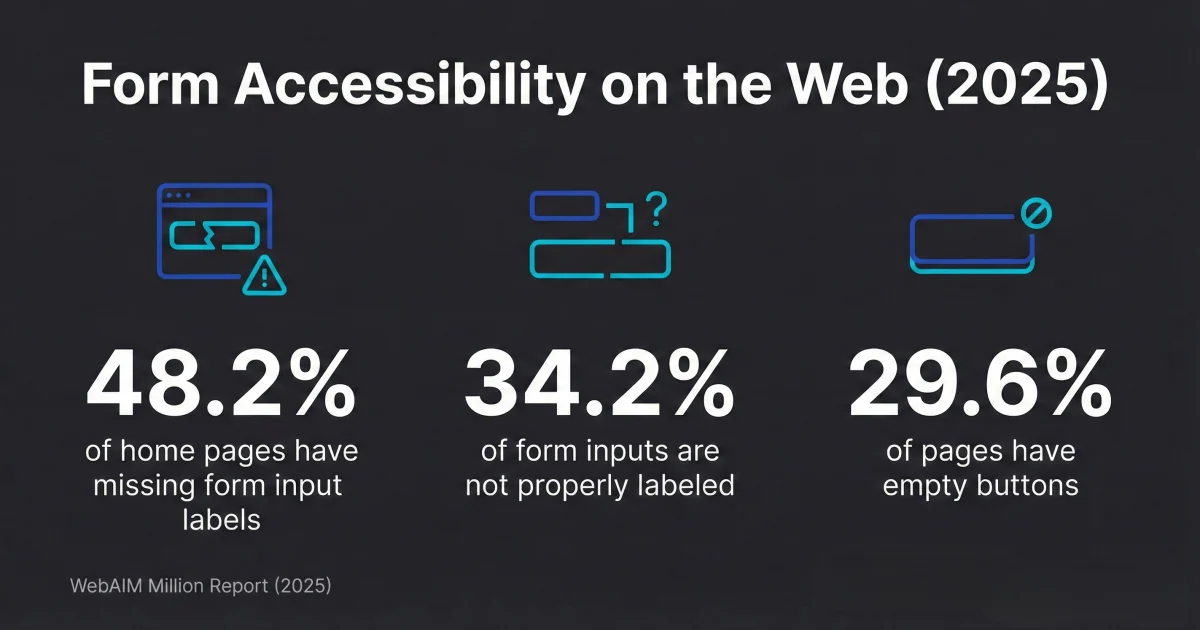
The short version: your website needs to work for people who navigate by keyboard, use screen readers, have low vision, or have other disabilities. That means proper color contrast, alt text on images, labeled form fields with proper error handling, keyboard-accessible navigation, and descriptive link text.
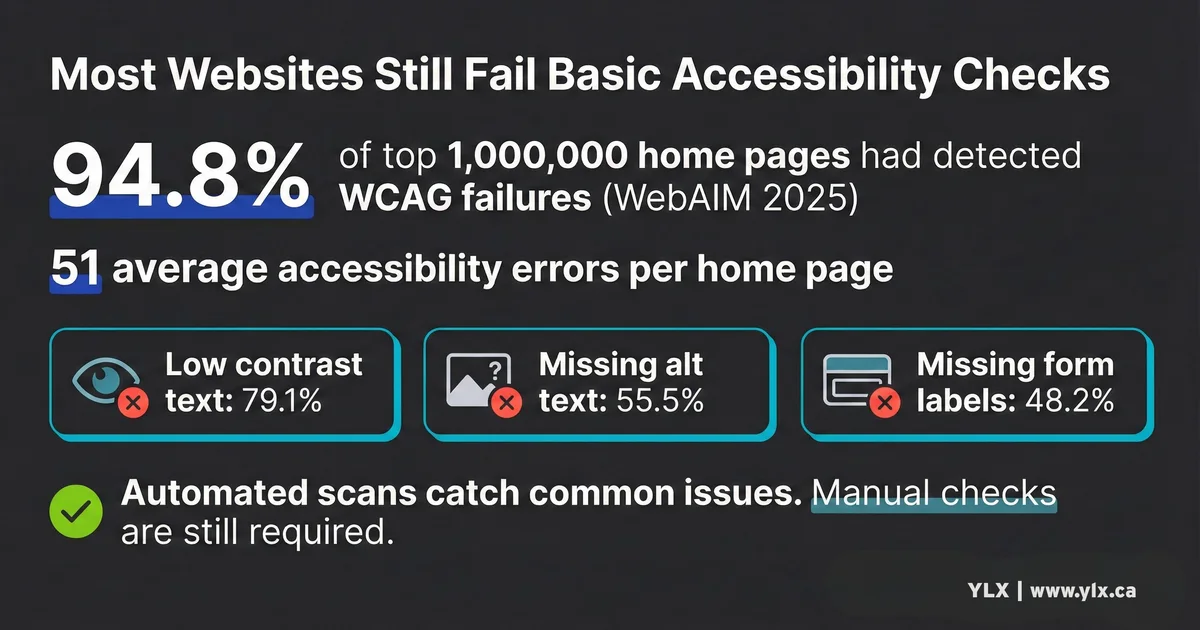
The WebAIM Million report (opens in a new tab) found that 94.8% of the top one million websites had detectable WCAG failures in 2025. The average page had 51 errors. If your site has issues, you're not alone. But that's not an excuse to leave them unfixed.
Common WCAG homepage failures include low-contrast text, missing alt text, empty links, and unlabeled form inputs
The Enforcement Reality
Let me be straight about enforcement, because most AODA content either ignores it or uses it to scare you into buying something.
On paper, the penalties are serious. Under section 37 of AODA (opens in a new tab), offence penalties can reach $100,000 per day for corporations and $50,000 per day for individuals or unincorporated organizations. Directors and officers can be held personally liable.
In practice, enforcement activity has varied over time. Regardless, the statutory penalties and Director's Order powers remain available under the Act.
Does weak enforcement mean you can ignore AODA? No. Three reasons:
The law can still be enforced. Ontario can use inspections, compliance orders, and monetary penalties under AODA. Weak enforcement history is not legal immunity.
The Human Rights Tribunal is a separate path. Anyone who experiences disability-related discrimination can file a complaint with the Ontario Human Rights Tribunal. This is entirely independent of AODA's administrative enforcement.
The business case stands on its own. Even if the government never audits you, an inaccessible website is turning away real customers with real money. More on that below.
The Overlay Trap
If someone offers to fix your AODA compliance by installing a widget on your site, be skeptical.
Accessibility overlays are tools like accessiBe and UserWay that add a toolbar to your website claiming to fix accessibility issues automatically. They're marketed as a quick, affordable path to compliance.
They don't deliver it.
In January 2025, the FTC announced an order requiring accessiBe to pay $1 million (opens in a new tab) over deceptive claims that its AI product could make websites WCAG-compliant. The FTC found these claims were "false, misleading, or unsubstantiated." The FTC also found that accessiBe paid for endorsements disguised as independent reviews.
The Overlay Fact Sheet (opens in a new tab), signed by over 1,000 accessibility professionals including contributors to the WCAG standard itself, explains why overlays fall short. Automated fixes can catch some issues, but they cannot make a website fully WCAG conformant. They also cannot fix structural problems in your code, and they can conflict with assistive technologies people already use.
If you want your website to be accessible, the work needs to happen in the code, not in a toolbar bolted on top. Our guide on testing your website for accessibility covers the free tools and manual checks that actually work.
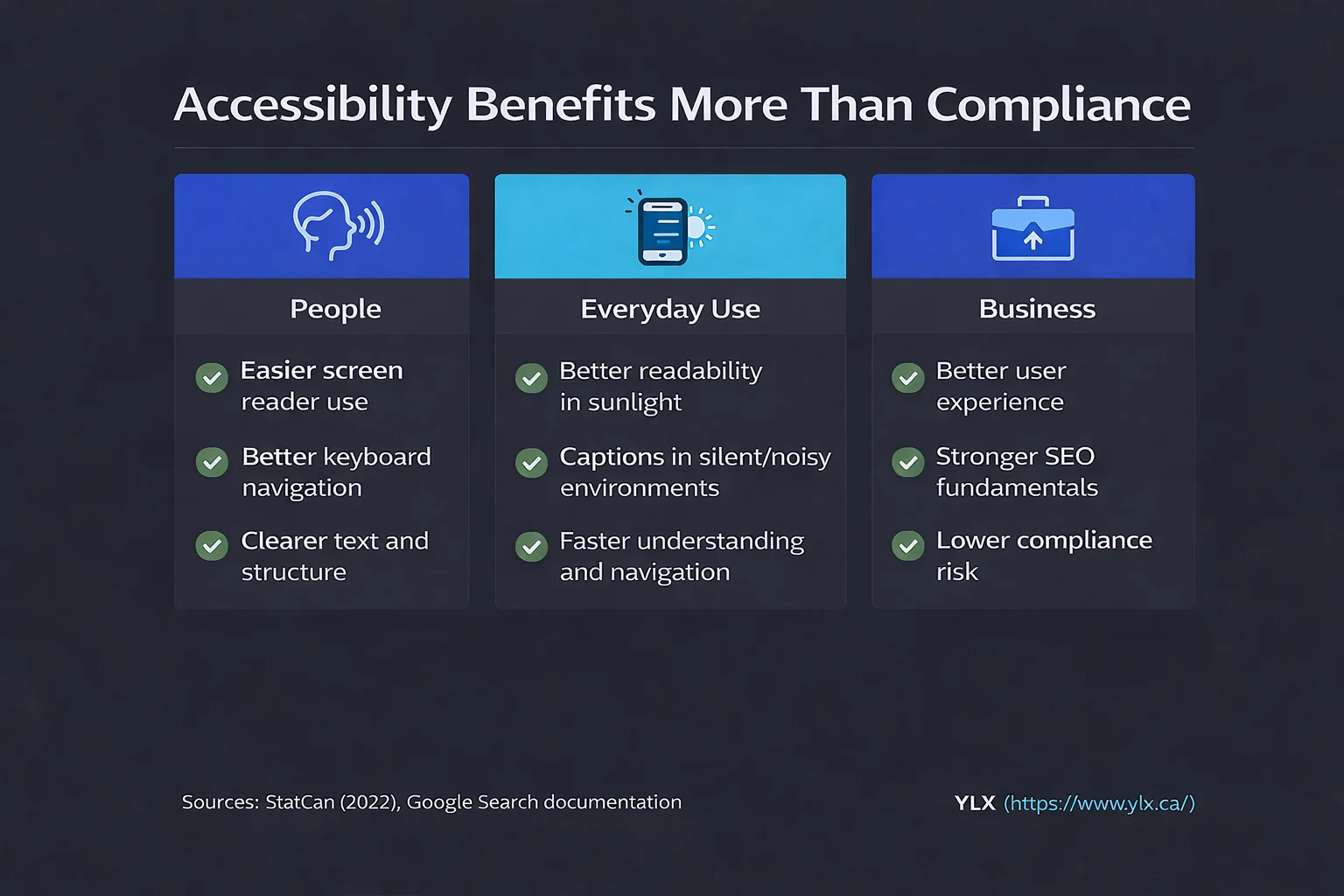
Accessibility improvements help real users by improving readability, keyboard use, and clearer page structure across devices
The Business Case Beyond Compliance
Whether AODA requires your website to be accessible or not, there are good reasons to do it anyway.
Statistics Canada's 2022 Canadian Survey on Disability (opens in a new tab) found that 27% of Canadians aged 15 and older have one or more disabilities. That's 8 million people nationally.
In Ontario alone, 2.9 million people are affected. The number is growing. It was 22% in 2017.
Canadians with disabilities have an estimated $55 billion in annual spending power (opens in a new tab). When your website doesn't work for them, that money goes to a competitor whose site does.
Accessibility improvements can also support SEO fundamentals. Google recommends descriptive alt text for images (opens in a new tab), and its SEO Starter Guide (opens in a new tab) recommends clear heading structure for readable content. Clean semantic code also tends to improve usability and performance. We explain the connection between speed and rankings in our post on why Core Web Vitals matter.
Accessible websites also work better for everyone. Captions help people watching video without sound. High contrast text is easier to read in bright sunlight. Clear navigation helps people in a hurry.
Designers call this the curb cut effect: features built for accessibility end up benefiting everyone. Sidewalk curb cuts were designed for wheelchair users, but parents with strollers, delivery workers with carts, and travelers with luggage use them every day.
What to Do Now
Here's a practical checklist based on your organization's size.
Every Ontario business (1+ employees)
- Train your staff on AODA customer service requirements
- Have a process for providing accessible formats when requested
- Keep records of who was trained and when
Businesses with 20+ employees (add these)
- File your compliance report by December 31, 2026 through Ontario's reporting portal (opens in a new tab)
- Review your current compliance across all AODA standards, not just the website
Businesses with 50+ employees (add these)
- Audit your website against WCAG 2.0 Level AA using free tools and manual checks
- Fix the most common issues first: contrast, alt text, form labels, keyboard navigation
- Develop a written accessibility policy and multi-year plan
- Post your plan on your website
- Budget for manual accessibility testing. Automated tools can help, but they cannot verify full accessibility compliance on their own according to the Overlay Fact Sheet (opens in a new tab)
Our guide to WCAG and how to check your site walks through the free tools and the most impactful fixes to start with.
What We Build
Every website we create follows WCAG 2.2 Level AA from the start. That goes beyond what AODA currently requires for large organizations (currently WCAG 2.0 Level AA (opens in a new tab)). Building above the minimum now reduces retrofit risk later.
Accessibility is part of our development process, not something added at the end. We build with proper heading structure, sufficient color contrast, labeled form fields, keyboard-accessible navigation, and visible focus indicators. We test with automated tools and manual keyboard navigation, because automated scans alone miss most issues.
Need Help With AODA Compliance?
If you're not sure whether your website meets AODA requirements, we can take a look. We'll audit your site against WCAG guidelines and explain what we find in plain terms. No jargon, no overlay pitch.
This post is educational information, not legal advice. For legal interpretation of your obligations, consult a qualified lawyer.
Get a free accessibility review: Contact us at info@ylx.ca
Analysis FAQ.
Does AODA apply to my small business website?
It depends on your size. All Ontario organizations with one or more employees must meet AODA customer service and training requirements. Website accessibility (WCAG 2.0 Level AA) is only required for organizations with 50 or more employees. Compliance reporting is required for those with 20 or more employees, with the next deadline on December 31, 2026.
What WCAG level does AODA require for websites?
AODA currently requires WCAG 2.0 Level AA, with exceptions for live captions (1.2.4) and pre-recorded audio descriptions (1.2.5). This is the same standard most accessibility laws reference worldwide.
What are the penalties for AODA non-compliance?
Corporations face fines up to $100,000 per day, and individuals up to $50,000 per day. Enforcement has historically been limited, but penalties and Director's Orders remain available under the Act.
Can an accessibility overlay make my website AODA compliant?
No. Automated overlays cannot address the full range of WCAG requirements. The FTC fined the leading overlay provider $1 million in 2025 for falsely claiming their tool could make websites compliant. The Overlay Fact Sheet, signed by over 1,000 accessibility professionals, confirms overlays are not a substitute for proper accessibility work.
Tagged with

Further Reading
Related Analysis.
Accessible Contact Forms: Build Pages That Work for Everyone
Nearly half of top websites have unlabeled form fields. Learn how to build accessible web forms with proper labels, error handling, and keyboard support.
How to Test Your Website for Accessibility (Free Tools)
Most websites fail accessibility checks. Use these free tools and manual tests to find high-impact issues, prioritize fixes, and improve your site's usability.
What Is WCAG? Web Accessibility Explained for Business
WCAG defines how to build websites everyone can use. Millions of people need accessible design to use the web. Here is what that means for your business.